
Data is the foundation of every winning SEO strategy. However, there is a significant difference between having access to information and knowing how to use it. Raw data, when misinterpreted, is often more dangerous than having no data at all — it leads to “gut feeling” decisions that can tank your rankings and waste your budget.
To drive real growth, you need to look exactly where the search engine looks. Google Search Console (GSC) is an SEO’s most reliable ally, providing a direct line of communication from Google about your site’s health and performance. But for many, the platform remains a maze of complex charts and filtered views.
At Niara, we bridge the gap between complex metrics and clear execution. We don’t just show you the numbers; we help you understand what they mean for your bottom line.
Keep reading to learn exactly how to use Google Search Console data for SEO, and discover how Niara makes it easier than ever to transform raw insights into measurable ROI.
Read more: How to Run a High-Performance SEO Audit with AI: From Data Chaos to Actionable Insights
Why Google Search Console data matters for SEO?
Google Search Console is essentially a direct line of communication between your website and Google’s robots.
Unlike third-party tools that estimate traffic, GSC provides first-party data: exactly how many people saw your link, clicked, and which queries they used. In the AI era, data-driven SEO means every update and technical fix is backed by evidence.
However, search is evolving. While clicks matter, they don’t tell the full story of brand influence. In a landscape of zero-click searches, impressions have become a strategic KPI. They measure your Share of Search, proving your content is the foundational source for generative snapshots.
To lead, SEOs must pivot toward topical authority. High visibility in AI-generated answers builds trust, even without an immediate click. By tracking visibility trends and CTR through GSC, and leveraging the latest Gen AI performance reports, you ensure your brand remains the primary voice in AI results.
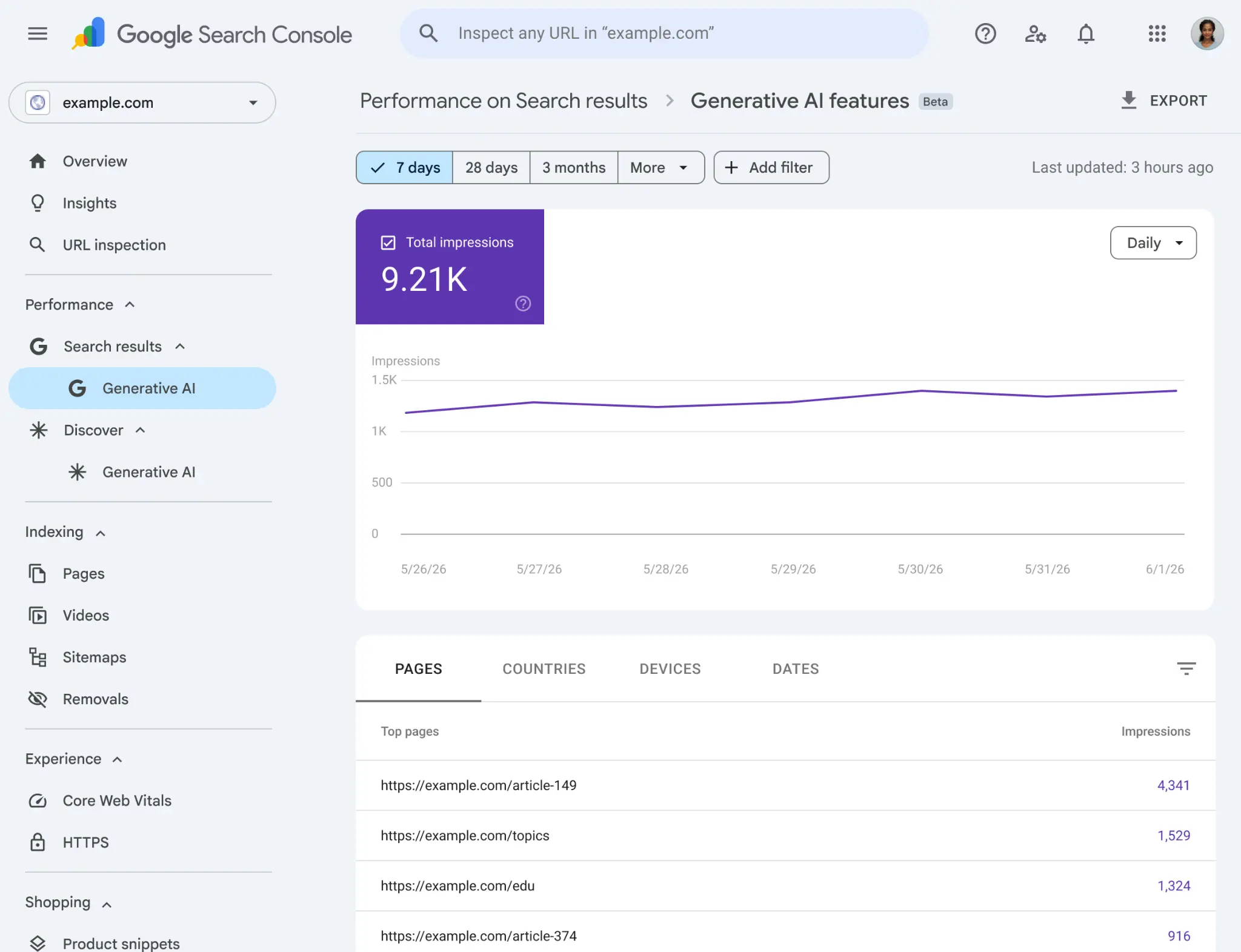
Once users land on your site, use GA4 to monitor Average Engagement Time and conversions. Combining GSC’s visibility with GA4’s engagement depth ensures a holistic strategy that values both brand authority and user retention. Stop guessing; start scaling.
3 Pillars of strategic data analysis with GSC
To truly understand how to use Google Search Console data for SEO, you must view your strategy through three distinct lenses that represent the lifecycle of a healthy website: being found, being relevant, and being chosen.
1. Technical health and indexability
Before you can worry about ranking number one, you must ensure that search engines can actually crawl, render, and index your content without friction. This is the crawl budget, the limited amount of time and resources Google allocates to explore your site. If your site is cluttered with errors or slow-loading pages, you are wasting that budget.
The primary data source here is the Index Coverage report in GSC. This report highlights which pages are successfully indexed and which are excluded due to errors like 404s (page not found) or “crawled – currently not indexed”.
In the age of AI-driven search, technical health is even more critical. Bots need to parse your site’s structure efficiently to index it not just for traditional search, but for generative AI summaries. If your technical base is broken, you are invisible to the future of search.
2. Topical authority and content gaps
Topical authority is the measure of your site’s expertise in a specific subject area. Google now ranks entities and authorities. To build this, you need to identify what you already rank for and where the “missing links” are in your content clusters.
By analyzing the Queries and Pages reports in GSC, you can see which topics Google associates with your domain.
If you find that you are ranking well for “digital marketing tips” but have no content regarding “AI in digital marketing,” you’ve identified a content gap. Closing these gaps by creating clusters of related content signals to Google that you are a comprehensive resource, which lifts the rankings of all pages within that topic.
3. User alignment and search intent
The final pillar is where data meets human behavior. Google’s algorithms are increasingly sophisticated at measuring whether a page actually fulfills the “search intent” — the reason why someone typed a query in the first place.
The Performance report in GSC is your primary feedback loop here. By analyzing the relationship between impressions, clicks, and average position, you can decipher if your content truly aligns with what users expect. If you have high visibility but low engagement, there is a mismatch between your value proposition and the user’s goal.
Optimizing for intent means using data to understand the nuances of the searcher’s journey. Are they looking for a quick answer, a deep-dive guide, or a product to buy? When you align your pages with these specific intents, you don’t just improve your CTR; you increase the quality of your traffic.
This pillar ensures that your SEO strategy is building a bridge between your brand and the right audience at the right moment.
How to use Google Search Console data for SEO?
Understanding the data is one thing; applying it is another. Let’s look at how to turn GSC insights into tactical moves.
1. Keyword cannibalization
Keyword cannibalization occurs when multiple pages on your site compete for the same search query. This confuses Google, often leading to lower rankings for both pages because the ranking power is split.
You can identify this in GSC by filtering for a specific query and looking at the “Pages” tab. If you see 3 or 4 different URLs getting impressions for the same term, you have a conflict.
The solution? Use data to decide which page is the strongest, then use 301 redirects or canonical tags (a way to tell search engines which version of a URL is the “master” version) to clean your site structure.
2. CTR optimization
Increasing your rankings is hard and takes time. Increasing your CTR is often faster and can double your traffic without you moving up a single spot. This is the art of “clickability”.
Use GSC to identify pages with high impressions but below-average CTR. Then, experiment with your snippets. Are you using power words? Is your value proposition clear? Does the title answer the user’s specific question? Small changes here yield massive ROI.
3. Connecting intent to performance
Advanced SEOs use advanced search analytics filters in GSC to filter for specific intents. For example, you can use a RegEx filter to see only queries that contain “how”, “what” or “why” to analyze your informational performance. Or, filter for “buy”, “price” or “shipping” to see how your transactional pages are doing.
This allows you to map the user journey and identify if you are losing potential customers at a specific stage of the funnel.
Spoiler alert: you don’t have to do this manually. With Search Analytics, Niara surfaces keyword cannibalization, “low-hanging fruits”, and search intent filters for you in a fraction of the time.
4. Striking distance keyword optimization
The “striking distance keywords” are queries where your page ranks between positions 4 and 15. The effort required to push a keyword from position 8 to position 3 is significantly less than the effort required to rank a brand new piece of content from scratch.
To operationalize this, filter your GSC performance report for queries with high impressions, an average position between 4 and 15, and a CTR below the industry average for that position. This signals that Google finds your page relevant enough to rank it on the first or second page, but users are choosing other results.
The action here is twofold:
- analyze the search intent of the top 3 ranking pages. Are they listicles, comprehensive guides, or product pages? If your page format doesn’t match the dominant intent, you must restructure the content.
- rewrite the title tag and meta description to be more compelling.
A 1% increase in CTR on a keyword with 10,000 monthly impressions yields 100 new visitors every month, with zero additional content creation costs.
5. Indexing diagnostic
Technical SEO is the foundation of organic visibility. If search engines cannot crawl, render, and index your pages, the highest quality content will generate zero traffic. GSC provides the exact diagnostic tools needed to audit this foundation.
The Page Indexing report is your primary dashboard for identifying GSC indexing issues. You must routinely monitor:
- why pages aren’t indexed;
- spikes in 404 errors (Not Found);
- 5xx errors (Server Error). A sudden increase in 5xx errors often indicates server overload or a misconfigured database, requiring immediate escalation to your engineering team.
6. Granular insights with the URL Inspection Tool
The GSC URL Inspection tool provides granular, page-level diagnostics. When you input a specific URL, GSC queries the live index to show you exactly how Googlebot sees the page. You can view the rendered HTML, check the HTTP response code, and verify if the declared canonical tag matches the one Google selected.
A canonical tag is a snippet of HTML code that tells search engines which version of a URL is the master copy, preventing duplicate content issues. If the URL inspection insights reveal that Google has chosen a different canonical URL than the one you intended, you are likely suffering from parameter duplication or thin content, diluting your page authority.
7. Mobile usability and Core Web Vitals
Mobile usability and page speed are non-negotiable ranking factors. The GSC Mobile Usability report flags critical errors that frustrate users on smartphones. Fixing errors mostly requires CSS adjustments to ensure a responsive design.
Simultaneously, the GSC Core Web Vitals report measures Largest Contentful Paint (LCP), Interaction to Next Paint (INP), and Cumulative Layout Shift (CLS). Poor LCP usually points to unoptimized hero images or slow server response times.
Prioritization framework: Effort vs. Impact
As an SEO professional, your time is your most valuable asset. You cannot fix everything at once. Use an “Effort vs. Impact” model based on real GSC data.
- High Impact/Low Effort: optimizing meta tags for page 2 keywords with high impressions.
- High Impact/High Effort: creating a new content cluster for a high-value topic where you currently have a gap.
- Low Impact/Low Effort: fixing a minor CSS error on a page with zero traffic.
The Effort vs. Impact model only works when you know exactly what you are looking for. But the quality of your strategy depends on how you extract data.
Google Search Console is a goldmine, but it is also vast. There is no “one size fits all” view; instead, there are dozens of ways to slice the data.
Before diving into the reports, professionals must first define their objective. Without a specific question, you are just looking at a vanity dashboard. You need to decide: are you looking for quick wins, diagnosing a traffic drop, or identifying new content opportunities?
How to use Google Search Console data for SEO content: my personal mensal loop analysis
Understanding your current performance is the first step toward creating future wins. Most marketers use Google Search Console only to see what happened in the past, but the real value lies in using that data to predict what should be written next. To transform raw data into a content strategy, you must look for content gaps and topic expansion opportunities.
Here is how you can operationalize your GSC insights to build a powerful SEO content engine:
- Continuous performance monitoring: analyze your performance on a Week-over-Week and Month-over-Month basis. This allows you to identify emerging trends, seasonal spikes, or sudden drops early enough to react.
- The “winner vs. loser” monthly audit: run a monthly comparative report to identify which pages gained the most traction and which ones lost visibility. This gap analysis helps you decide exactly what needs an optimization and which successful topics should be expanded into new articles to strengthen your topical authority.
- URL-level query mining: go beyond aggregate data. Analyze your top-performing URLs individually to see the specific queries driving their traffic. You will often find “hidden” keywords that you didn’t originally target. You can then decide to either enrich the existing page with this new information or create a brand-new, dedicated piece of content to capture that specific intent.
- Prioritize the “striking distance” keywords: filter your report for URLs with an average position between 4 and 15. In these pages, a targeted optimization, like improving the H1, adding internal links, or updating the data, is often enough to push them up, where the majority of clicks and impressions happen.
- Identify topic expansion opportunities: use the queries that have high impressions but zero clicks as a roadmap for your next content clusters. Creating new, high-quality content around these specific gaps will signal to the algorithm that you are a comprehensive source on the subject.
A final reminder: volume is not a synonym for quality, nor a guarantee of performance. While Google Search Console provides the roadmap, simply publishing content at scale based on these data points isn’t enough to win the long game. Success in the age of AI requires a sharp editorial eye. Without human curation to ensure accuracy, tone of voice, and unique value, even the most data-driven strategy can fall flat.
How Niara empowers the modern SEO professionals
Niara was built to be your strategic engine, taking the heavy lifting of data processing and turning it into actionable roadmaps. Here is how we simplify your daily SEO workflow:
1. Automating technical health and troubleshooting
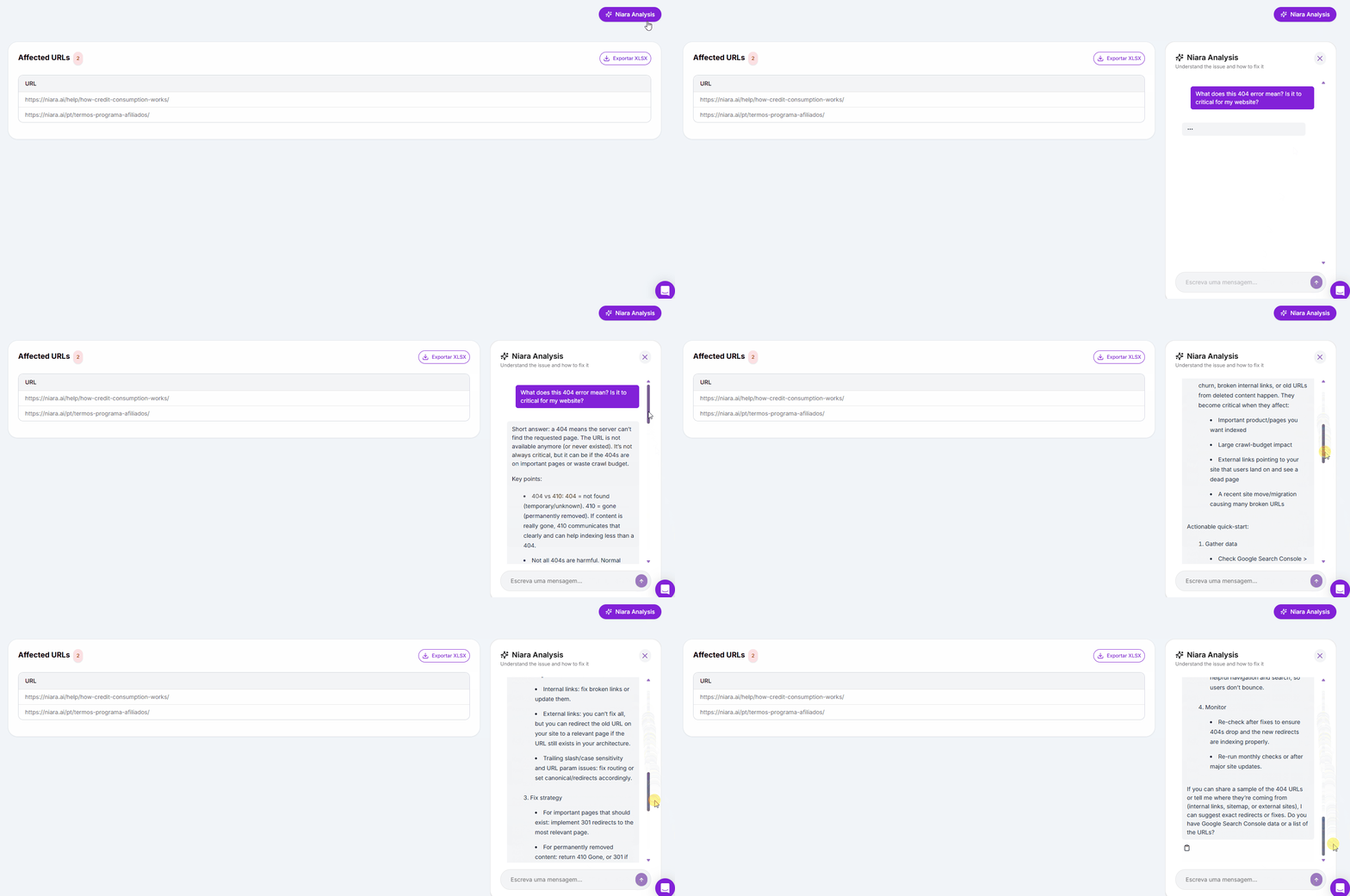
Maintaining a site’s technical integrity is often the most grueling part of an analyst’s routine. Instead of manually digging through error logs or trying to decipher cryptic messages in the GSC “Enhancements” report, you can use our Site Audit, Niara’s Technical SEO Agent.
By integrating your Google Search Console and PageSpeed Insights data, the agent not only list issues, but explains them and provides specific fixes tailored to your CMS (like WordPress, Shopify, or custom builds).
This transforms technical audits from a time-consuming chore into a clear, prioritized checklist, ensuring your technical debt never holds back your rankings.
2. Building topical authority with data-driven planning
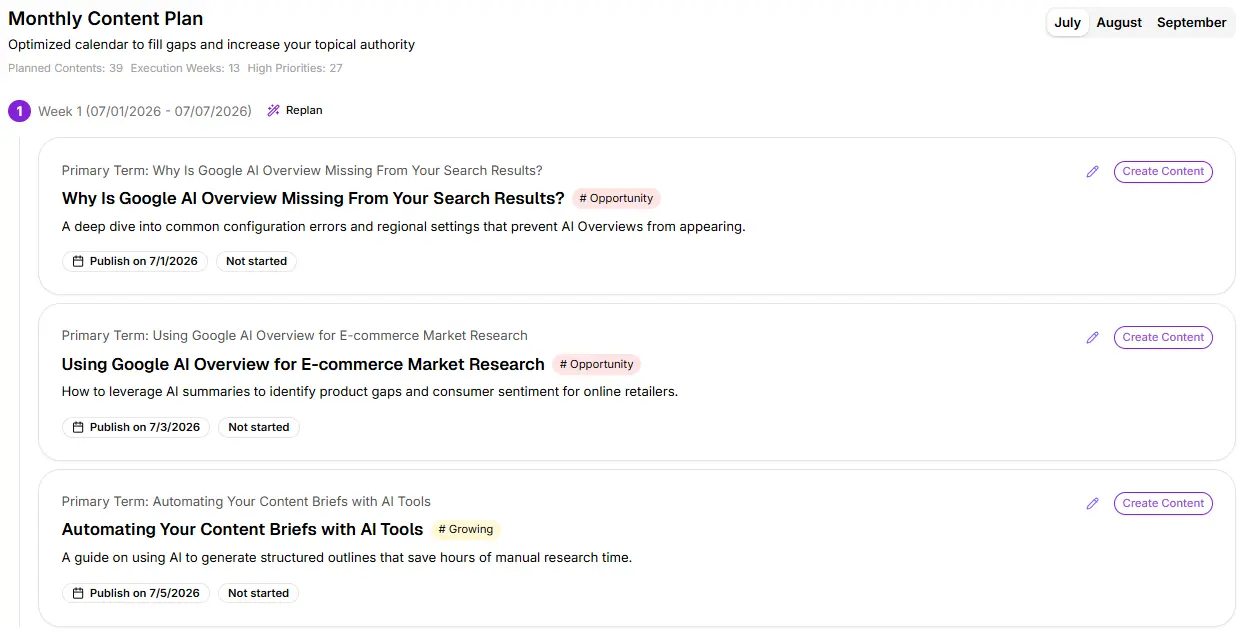
Establishing authority in a niche requires more than just writing articles; it requires a deep understanding of content clusters and gaps. Most SEOs spend weeks on manual content mapping. With Niara’s Authority Map, that process takes seconds.

The tool analyzes your Search Console data to identify exactly where you are winning and where your “topical weight” is lacking. It points out the gaps in your strategy and, with a single click, generates a comprehensive 3-month editorial calendar.
All the topics are strategically chosen and designed to build the authority Google is looking for on your website. This ensures your content strategy is always backed by real performance data, not just keyword volume.
Read more: How to Build a Topic Authority Map: From GSC Data to ROI
3. Turning complex data into natural conversations
Data is only useful if you can interpret it quickly. Moving beyond static spreadsheets, modern professionals are now using Search Analytics with conversational capabilities.
Through ChatSEO, you can literally talk to your data. Instead of building complex pivot tables, you can ask questions like:
- Which pages lost the most clicks last month?
- Identify high-impression queries where I’m in position 11-15.
- List the last week top 10 queries with a CTR below 2%.
This Conversational Analytics approach provides 5x more data depth than the standard GSC interface while allowing you to make strategic decisions in a fraction of the time. It’s like having a data scientist sitting right next to you, ready to answer any question instantly.
4. Scaling content production without losing quality
When managing e-commerce or large-scale Enterprise projects, the sheer volume of meta tags, product descriptions, and alt texts can become a bottleneck. You know you need to optimize them based on GSC data, but there aren’t enough hours in the day.
By utilizing Niara’s Bulk Content features, you can generate hundreds of optimized titles, descriptions (and product descriptions) in minutes. More importantly, because you can configure your Brand Voice Guidelines in the settings, every single piece of content generated will maintain your specific tone and style.
This automation handles the repetitive execution, allowing you to maintain a consistent brand voice across thousands of pages while freeing up your schedule to focus on high-level ROI and long-term strategy.

Read more: SEO Automation: 9 Tasks to Stop Doing Manually Now
The end of analysis paralysis: your move
For too long, SEO professionals have been buried under a mountain of spreadsheets, losing precious hours to manual analysis while competitors seized the SERP. But as we’ve seen, the “I guess” era is over. We are now in the era of the AI-empowered strategist.
Google Search Console gives you the “what”, but Niara gives you the “how” and the “when.” By automating the heavy lifting of data processing, technical troubleshooting, and content mapping, we give you the clarity to make bold, winning business decisions.
The future of search belongs to those who can bridge the gap between human creativity and machine efficiency. Are you ready to stop being a data processor and start being a growth architect?
Simplify your SEO and scale your results. Discover how Niara transforms your GSC insights into a roadmap for success. Try it for free today!
