
Doing SEO today is not what it was two years ago. The problem is that while search technology has accelerated, the daily routine of marketing professionals remains stuck in slow manual processes: complex technical audits, generic content production, and data analysis that takes hours in spreadsheets.
This gap between AI speed and manual operations doesn’t just delay results, it causes you to lose market share daily to more agile competitors.
Niara was born to close this gap, unifying the SEO, GEO, and AEO workflow, from technical analysis to results monitoring. In this guide, we will show you how to change the game.
Learn more: Future of Search: AI, Agents and the Multi-Surface Discovery Era
1. Technical SEO for the AI era
Technical infrastructure (indexability, rendering, and structured data) allows Large Language Models (LLMs) to interpret the context and accuracy of your information. If there are technical barriers, your brand ceases to exist for generative features.
On our platform, Niara offers features that help you track and structure technical SEO in the AI era.
Site health monitoring
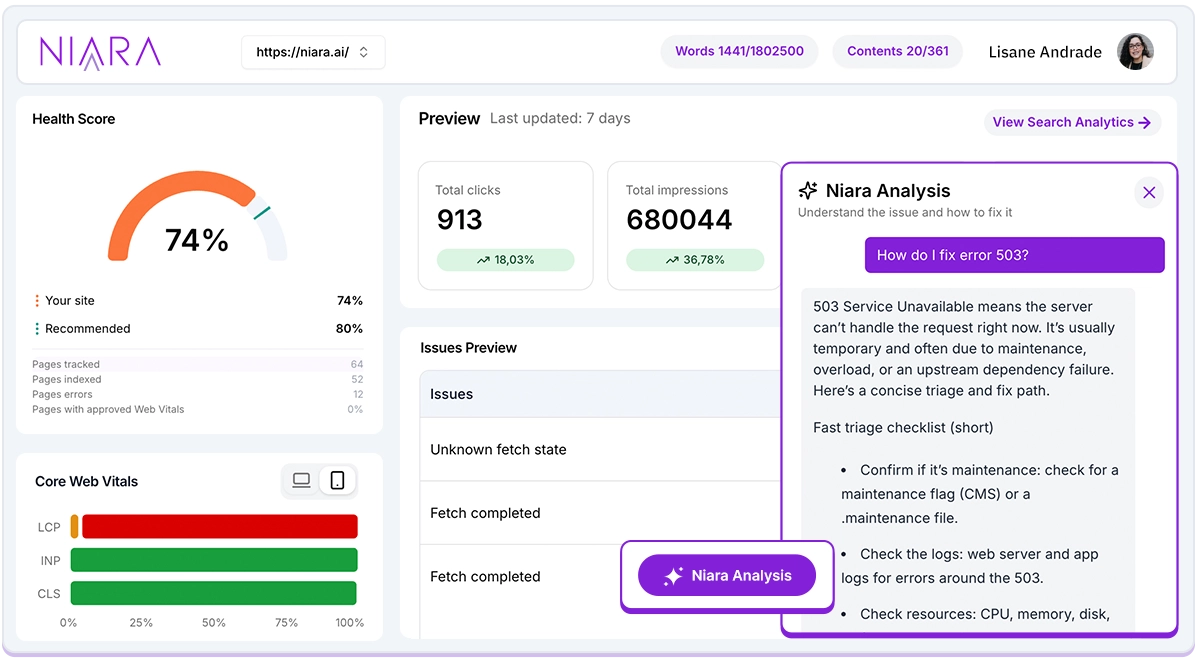
- The current scenario: AI crawlers visit sites much more frequently than traditional bots. Manually identifying a high LCP that tanks your performance or an indexing error across dozens of Search Console and PageSpeed Insights tabs is exhausting and slow.
- Niara’s solution: the Technical SEO Agent centralizes technical and performance data in a conversational interface. It doesn’t just point out the error, it acts as a 24/7 consultant that explains how to fix it according to your CMS.
How to use Niara’s Technical SEO Agent?
- After connecting your Google Search Console account to Niara, you will see the dashboard with the list of errors, criticality levels, and Core Web Vitals data.
- In the error panel, click on an alert and select “Niara Analysis.”
- Follow the step-by-step recommendations to resolve the issue or pass it on to the IT team.
Structured data markup (schema markup)
- The current scenario: creating JSON-LD code manually is complex and prone to errors that confuse search engines.
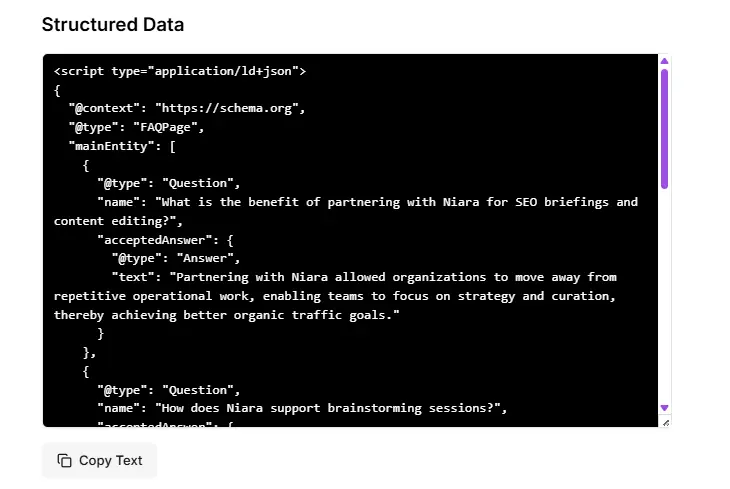
- Niara’s solution: the Structured Data Generator automates JSON-LD code creation (Google’s preferred format). With the code ready and validated, AI understands what is a product, an article, or a review.
How to use Niara’s Structured Data Generator?
- Click on the “Extra Tools” section in the side menu to view the feature.
- Enter the URL of the page you want to optimize.
- Select the schema type and language.
- Click generate and copy the JSON-LD code to implement in your site’s header.
Robots.txt, sitemaps, and technical configurations
- The current scenario: an error in robots.txt can de-index your entire site. Generic tools like ChatGPT often suggest outdated commands or syntax that Google no longer supports.
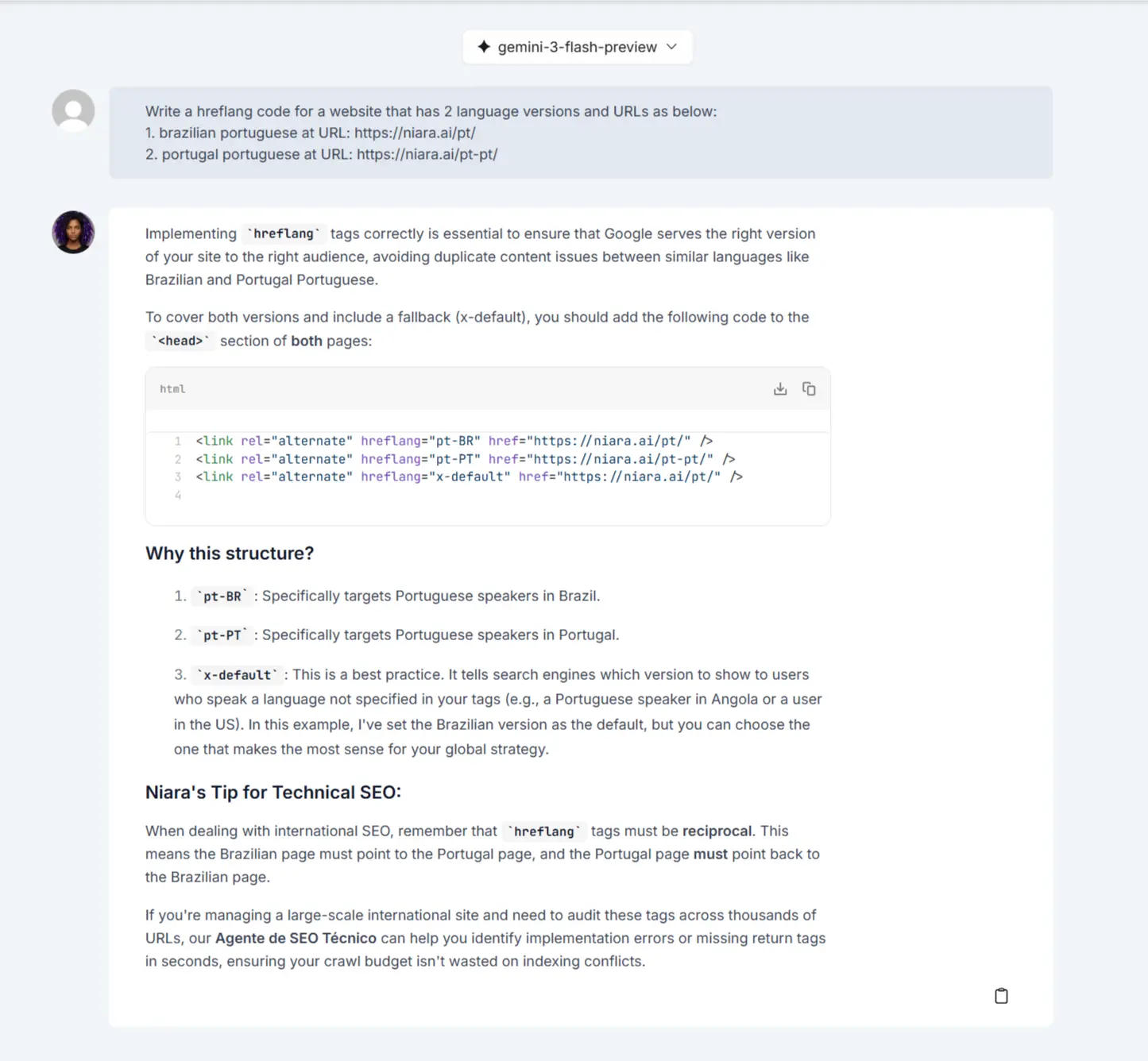
- Niara’s solution: ChatSEO has a Prompt Library with a section dedicated to Technical SEO, trained based on Google’s guidelines.
How to use technical SEO prompts in ChatSEO?
- Open ChatSEO and click on the “Prompts” option.
- Select the Technical SEO category.
- Choose the desired prompt according to what you need to generate.
- Fill in the requested information and receive the configured file.
2. Creating new content optimized for GEO
Creating content today requires a mindset shift: we are moving from repetition to radical utility.
Niara simplifies this process by combining production speed, depth, and the tone of voice your brand demands.
Building topical authority
- The current scenario: identifying clusters and content gaps manually takes weeks. Without this, you create isolated posts that don’t build authority.
- Niara’s solution: the Authority Map transforms raw data from your Google Search Console into an editorial calendar for up to 3 months. In seconds, it identifies dominant clusters, pointing out exactly where the content gaps are and how to fill them.
How to use Niara’s Authority Map?
- Access the “Authority Map” tool in the side menu.
- Select your goal and click “Create Authority Map.”
- View the executive summary, which gives you an overview of dominant topics and gaps, and refine ideas if necessary.
- Click “Create Calendar” to generate a plan for up to 3 months focused on identified gaps and seasonality.
Read also: Niara Authority Map vs. Yoast AI Content Planner: Which is the best content planning tool?

Blog posts, landing pages, and product descriptions optimized for AI
- The current scenario: generating generic text no longer works. Content needs context intelligence, analyzing what competitors are doing and what Google expects for that specific search intent.
- Niara’s solution: the Content Workflow automates the personalized production of blog posts, landing pages, or product descriptions. It analyzes the SERP in real-time, structures complete briefs, and builds the text automatically applying the tone of voice defined in your Brand Guide.
How to use Niara’s Content Workflow?
- In addition to the main term and goal, choose the content type, search intent, and SERP country.
- On the competitor analysis screen, click “Generate brief based on SERP” to create the content brief automatically.
- In the Content Creator, click “Generate Draft with AI” so Niara writes the final text following your identity and SEO best practices for AI optimization.

Intent mapping and query fan-out for established sites
- The current scenario: answering only the obvious makes your content commoditized. To win, you need to anticipate the user’s next questions (fan-out queries).
- Niara’s solution: through Search Analytics and ChatSEO, you identify real questions and expand content to cover the topic completely in a conversational way.
How to use Search Analytics and ChatSEO for fan-out?
- Access ChatSEO and ask Niara: “@gsc list which queries with (indicate intent) search intent generated the most impressions in (indicate period)”
- After the listing, follow up in the same chat with the command: “Based on these queries, generate a list of frequently asked questions and expand into possible related fan-out queries.”
- Use these ideas to create FAQ sections or new in-depth paragraphs in your text.
Intent and keyword mapping for new sites
- Niara’s solution: if you don’t have enough data, use AI Agents to kickstart your strategy.
How to use Niara’s AI Agents for keyword ideas and search intent?
- Access AI Agents in the side menu and search for “Keyword ideas.”
- Fill in the fields, indicating how many words you want, and click “Generate content” to get the full list.
- Copy this list and, again in AI Agents, search for “Keyword search intent.”
- Paste the list into the keyword field and click “Generate content” to understand how to best use the terms across the site.
Semantic enrichment
- The current scenario: organic and AI algorithms look for entities and relationships. Content that doesn’t explore a topic’s ecosystem deeply is read as “shallow” and will hardly be cited as a primary source in an AI Overview.
- Niara’s solution: Niara offers dedicated AI Agents and specialized prompts to ensure your content has the semantic density needed to be recognized.
How to use Niara’s semantic enrichment features?
- Via AI Agents: access the “Semantic Keywords” AI Agent, enter your main term, and receive a list of contextual terms to strengthen your topical relevance.
- Via ChatSEO: open the Prompt Library and use the “Intent and Micro-intents” model to better understand what the user wants to find when performing a specific search.
- Apply the suggestions throughout your site to strengthen the relevance signal for AIs.
3. Optimizing existing content for GEO
The true treasure of SEO is usually in what has already been published. However, old content can be wordy, outdated, or structured in a way that AIs cannot process clearly. Optimizing what already exists is the fastest way to improve performance.
AI adherence diagnosis
- The current scenario: you have pages that already rank, but you don’t know why they don’t appear in AI Overviews.
- Niara’s solution: Google AI Mode Insights eliminates guesswork. The feature works like an X-ray that crosses your page with official Google documentation on generative search.
How to diagnose your page in AIM Insights?
- Click on “AI Mode Insights” in the side menu to view the feature.
- Enter the URL and select the page type and search intent.
- Analyze the score, fan-out queries, topic gaps, and recommendations to understand where content is shallow or where the data structure fails for new search standards.
- Apply fixes based on what makes sense for the page type and business strategy.
Smart recycling and multimodality
- The current scenario: Google values different response formats (text, video, image). Ignoring this means losing traffic entry points.
- Niara’s solution: we transform existing assets into new traffic entry points through the YouTube to Article tool.
How to use Niara’s YouTube to Article tool?
- Click on the “Extra Tools” section in the side menu to view the feature.
- Add the video URL and the output language. Click “Generate Article” to create complete content optimized for organic search engines.
Visual accessibility and image SEO
- The current scenario: images without descriptions or with generic text are invisible to visual search and harm the experience for users with screen readers, negatively impacting your E-E-A-T.
- Niara’s solution: with the Alt Text Generator, you eliminate the manual work of describing every visual element. Niara analyzes the image and automatically creates descriptive, optimized text.
How to optimize images in seconds with Niara?
- Click on the “Extra Tools” section in the side menu to view the feature.
- Enter the image URL, keyword, and the language you want to optimize.
- Niara will process the image and deliver the full HTML with the description and ALT tags filled in strategically.
4. Creating content for social media
Social media has moved beyond just engagement channels to become data sources for AIs. Google now indexes and transcribes videos, audio, and images, displaying posts from Instagram, YouTube, and other networks directly on the SERP. Being optimized on these platforms ensures your brand is found at every touchpoint of the user journey.
Strategic planning and editorial lines
- The current scenario: many brands fail on social media because they create random posts. AI needs to understand what your brand is an expert in.
- Niara’s solution: the Prompt Library in ChatSEO transforms your technical knowledge into a structured attack plan, from idea conception to post organization.
How to build your social presence with Niara?
- In ChatSEO, use the “Editorial Line” prompt to define your content pillars.
- Then, select the “Editorial Calendar” prompt (also available in the Library) to organize post frequency, ensuring no important topic is left out.
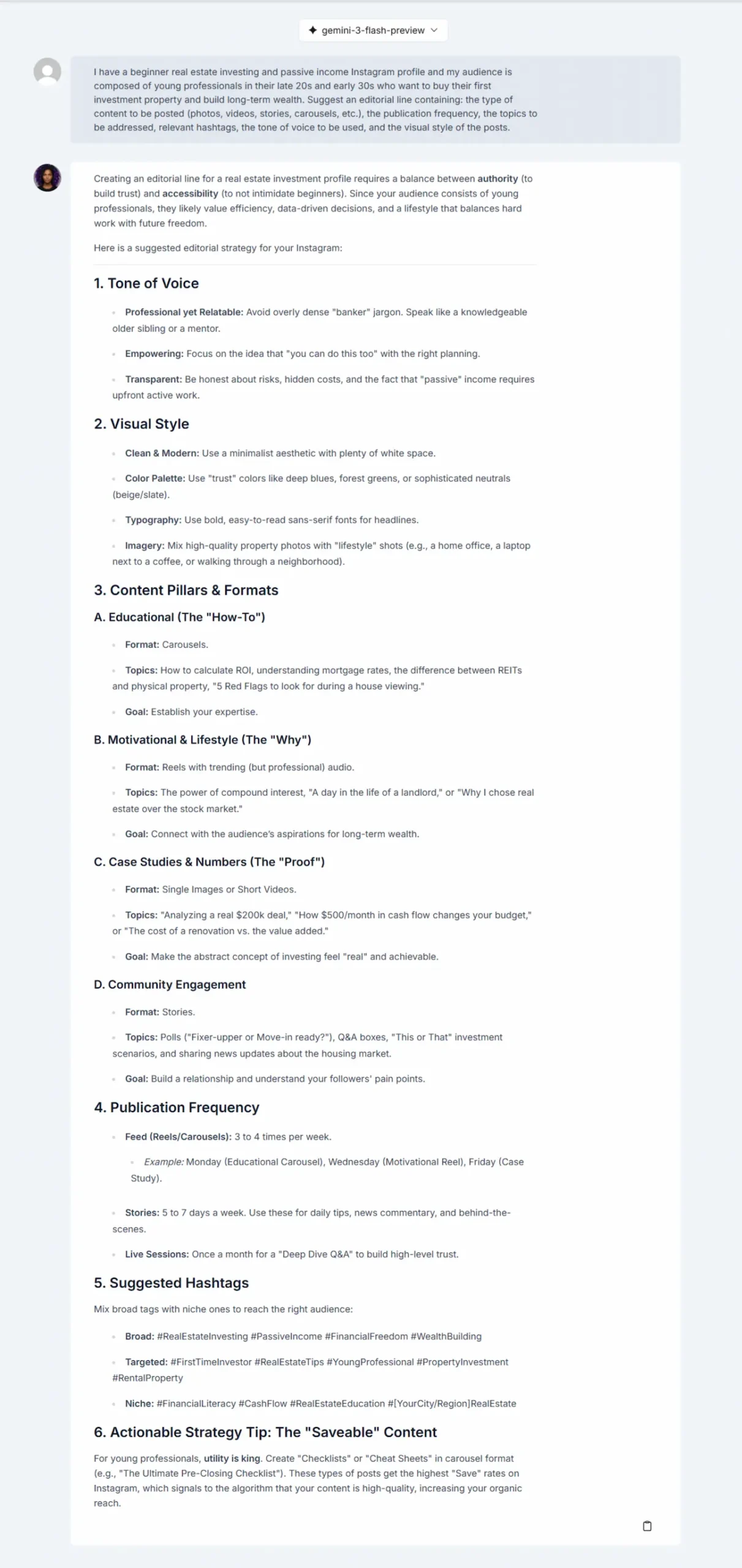
Creating visual content and carousels
- The current scenario: creating informative carousels helps with user retention and provides structured data (via captions and text) for search bots.
- Niara’s solution: the “Instagram Posts” AI Agent delivers the full package: the visual script for each carousel card and the optimized caption.
How to create Instagram posts with Niara?
- In AI Agents, select “Instagram Posts.” Niara will deliver the card structure (including background and text suggestions) and the caption.
- If you need Reels ideas or help with video script creation, you can use the “Reels Theme Ideas” and “Reels Script” prompts in the ChatSEO Library.
Video authority
- The current scenario: YouTube remains one of the largest search engines in the world. Well-optimized videos appear at the top of Google, but for this, metadata must be in sync with search intent.
- Niara’s solution: through specific Agents and dedicated prompts, Niara handles the entire SEO layer of your video, increasing the chances of it being suggested by AIs.
How to dominate video search with Niara?
- In AI Agents, search for “YouTube Video Ideas.” Niara generates 10 video suggestions based on your audience.
- Then, in ChatSEO, go to the Library and use the “Video Calendar” prompt to plan your recordings.
- After recording, use the “Title, Description, and Tags” prompt in ChatSEO. Niara will generate a title, a rich description, and the most relevant tags for the algorithm.
5. Performance monitoring without spreadsheets
Modern SEO is a continuous cycle of adaptation. Monitoring performance means having the security that your strategy is aligned with the future of search, allowing for quick adjustments to keep your brand in the spotlight.
Data intelligence without spreadsheets
- The current scenario: you spend hours crossing Google Search Console data in complex spreadsheets to try and understand which terms actually bring results.
- Niara’s solution: Search Analytics offers five times more data than standard GSC, with native search intent filters and an interface that prioritizes strategic clarity.
How to analyze your data in Search Analytics?
- Access Search Analytics in the side menu.
- Use the Search Intent filters to understand at which stage of the journey your site is strongest.
- In the Quick Wins tab, identify keywords starting from the second page and use Niara to optimize and push them to the top.
Conversational Analytics: talk to your data
- The current scenario: you need a quick insight for a meeting or report but don’t have time to mine the data manually.
- Niara’s solution: through ChatSEO, you can talk directly to your Search Console data. It’s like having a dedicated BI analyst 24/7.
How to use Niara’s Conversational Analytics?
- Open ChatSEO to talk to your data.
- Ask direct questions like: “@gsc what were the top 10 keywords that grew the most in clicks over the last 30 days?” or “@gsc which pages lost positions in the last 15 days?”.
- Niara will deliver the ready answer, accompanied by practical suggestions on what to do to reverse drops or scale gains.
Identifying opportunities in generative searches
- The current scenario: generative searches are changing traffic, but traditional GSC doesn’t clearly show where you are appearing in these new contexts.
- Niara’s solution: in the “Conversational” tab of Search Analytics, we identify the exact queries that have generative search characteristics.
How to analyze conversational searches in Niara?
- In Search Analytics, filter queries in the Conversational tab.
- Analyze long-tail terms and complex questions where your site already has visibility.
- Use these insights to fuel your site, whether by optimizing or creating new content that answers these questions.
Read also: Is your brand ready for AI? How to migrate from keywords to conversational SEO
Start optimizing your site for GEO today
The SEO lifecycle is now dynamic and circular: the data you monitor today should fuel tomorrow’s brief, which in turn needs to be technically optimized in real-time.
Niara was designed to eliminate this operational friction.
By centralizing Search Console data intelligence, Core Web Vitals technical diagnostics, and content creation that respects your brand’s tone of voice, we deliver what the modern marketing professional needs most: time to be strategic.
If you are looking for a platform that goes beyond the basics and offers an end-to-end solution, your search ends here.
Create your Niara account now and experience what it’s like to do SEO with more efficiency and 100% control over your AI strategy.
