
Tired of searching for ready-made prompts online or wondering how to make the best requests to AI? Your search is over. Introducing Niara’s new and improved Prompt Library, your command center for accelerating SEO and digital marketing tasks.
With over 50 prompts tested and approved by our team, you’ll have instant access to effective commands for various areas. Keep reading to discover how to use this feature to save time and boost your strategy.
What is Niara’s Prompt Library?
The Prompt Library is a collection of ready-to-use commands designed to get the best responses from ChatSEO. Instead of starting from scratch, you can select a prompt and simply fill in your project’s specific information.
It has been organized into categories to streamline your workflow, covering the main areas of digital marketing:
- Content
- Information Architecture
- SEO (Keywords, Technical, Local, Link Building)
- User Experience (UX)
- E-commerce
- YouTube
- Google Ads
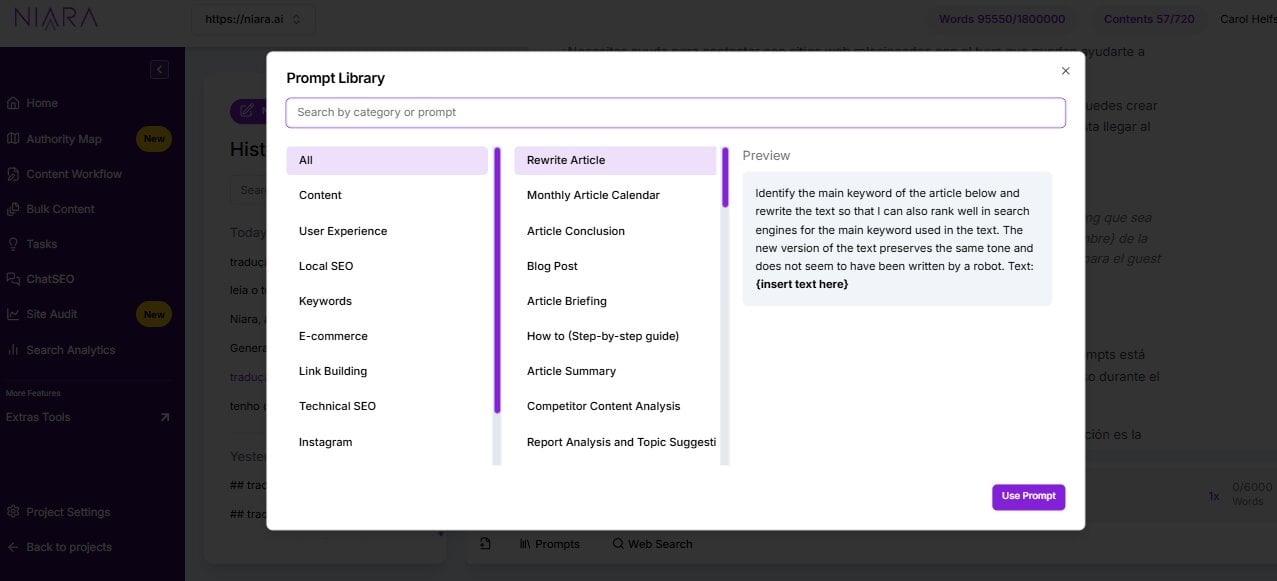
How to Access and Use the Prompt Library (Step-by-Step)
Using the library is a quick and simple process. Here’s how:
- Access your Niara account: Log in to the platform.
- Open ChatSEO: In the side menu, click on the “ChatSEO” option.
- Open the Library: Click the “Prompt” button, located in the left corner of the dialogue box.
- Browse and Choose: Select the desired category and task.
- Customize the Prompt: The prompt will appear in the chat with fields in curly braces {example}. Replace these fields with your information.
- Send the request: Press “Send,” and within seconds, Niara will deliver a complete response.
Supercharge your prompts with document attachments
ChatSEO now allows you to attach external documents like PDFs, spreadsheets (Excel, CSV), and text files (.doc, .txt).
This makes using the Prompt Library even more powerful. It’s now much easier to use content, marketing and SEO prompts for report analysis, for example. Simply choose the prompt from the library, upload your report, and start chatting with your data to extract valuable insights.
How Does the Prompt Library Boost Your Strategy? (Practical Examples)
To demonstrate the power of the library, let’s explore some categories and see concrete examples of how the prompts can be applied.
1. Content Creation and Strategy
Content creation is an essential part of any digital marketing strategy, as it helps promote brands and attract users. However, creative blocks can hinder the development of new ideas and topics. With Niara’s Prompt Library, you can develop content ideas, a complete plan for your blog, step-by-step guides, summaries, and specific snippets for your text.
Check the example below:
Challenge: Analyzing what already works to plan the next steps with more confidence.
How the Library Helps: Use prompts to analyze your top-performing content and generate new strategic topics.
Prompt Example:
I am an SEO specialist, and below, I will provide the 10 articles that generated the most traffic to my site. You will analyze the titles and provide two things:
- What semantic groups they have in common.
- Suggest 10 new topics for me to write articles on, based on the data analysis below. I want to expand on the topics of the articles below, whether by detailing, deepening, complementing, or covering related themes.
Here are the 10 articles for you to analyze: {provide the titles, one per line, in a list}
2. Information Architecture and UX
User experience is one of Google’s key ranking factors. Google not only analyzes a site’s content to determine its ranking but also the experience offered to those who visit your domain. Therefore, prioritize your user!
Use Niara’s prompts to help you create the best navigation for your customers. See the example below:
Challenge: Structuring a website logically for both users and Google.
How the Library Helps: Get a complete skeleton for your site’s architecture, making navigation and SEO easier.
Prompt Example:
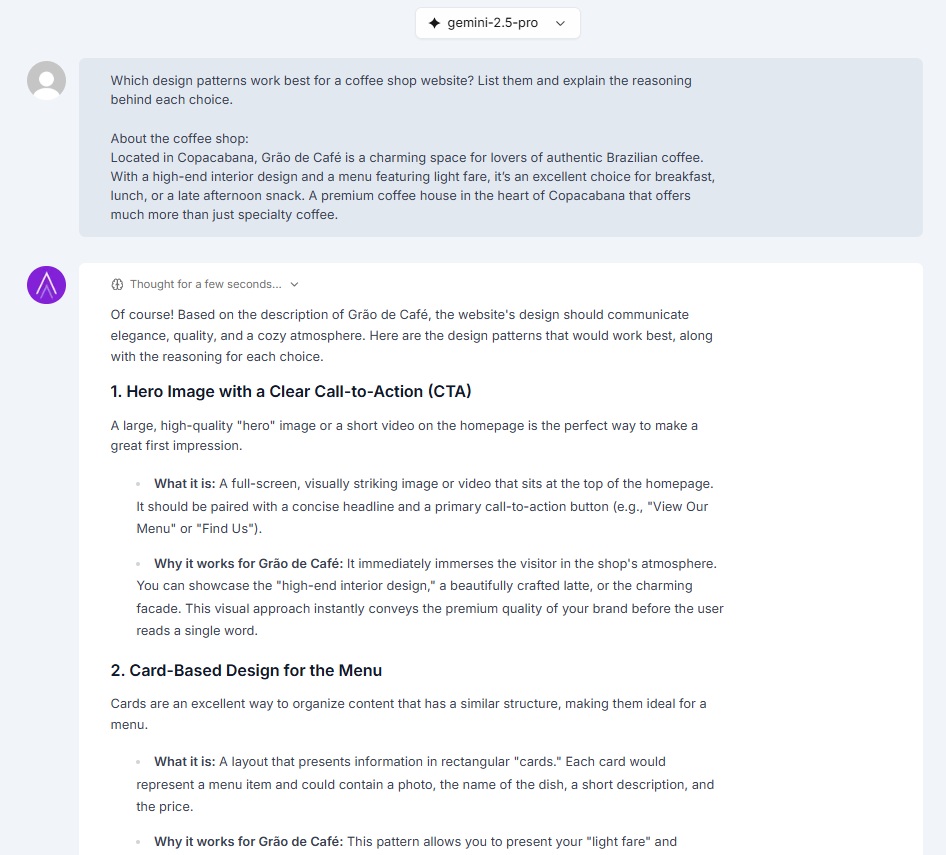
Create an information architecture example for a {site niche} website, explaining what each page should contain.
In the example below, Niara suggested a total of 5 items for the website layout, including CTAs:
3. SEO Optimization
The library covers various SEO fronts, ensuring your strategy is comprehensive.
Keyword Research
Every SEO strategy needs keywords! By choosing the right keywords, your site appears to relevant users, gains more visibility/authority in a specific niche, and achieves more conversions.
In addition to the available AI Agents for SEO specific to this type of research, the prompts in Niara’s Library will boost your work as an SEO professional.
Prompt Example:
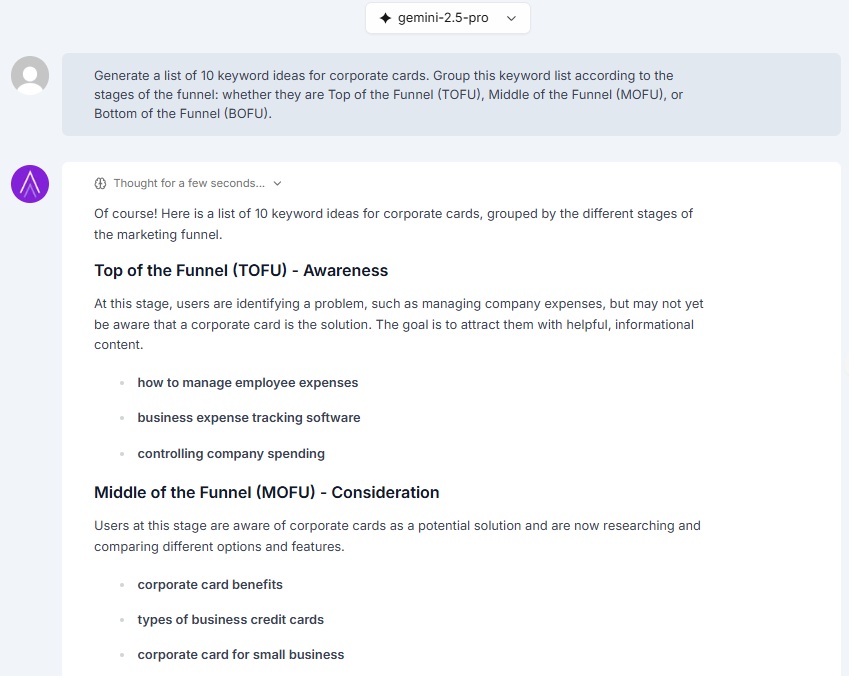
Generate a list of 10 long-tail keywords related to the main keyword “{your keyword}” for a blog about {your niche}. Organize them by search intent (informational, transactional, navigational).
Local SEO
Local SEO is an important strategy to increase a business’s visibility and traffic. In the Prompt Library, you’ll find specific inputs that can help you with this, making your company a standout in its region. Mastering local SEO is essential for businesses that rely on foot traffic or service areas, and our prompts simplify the optimization of your Google Business Profile.
Prompt Example:
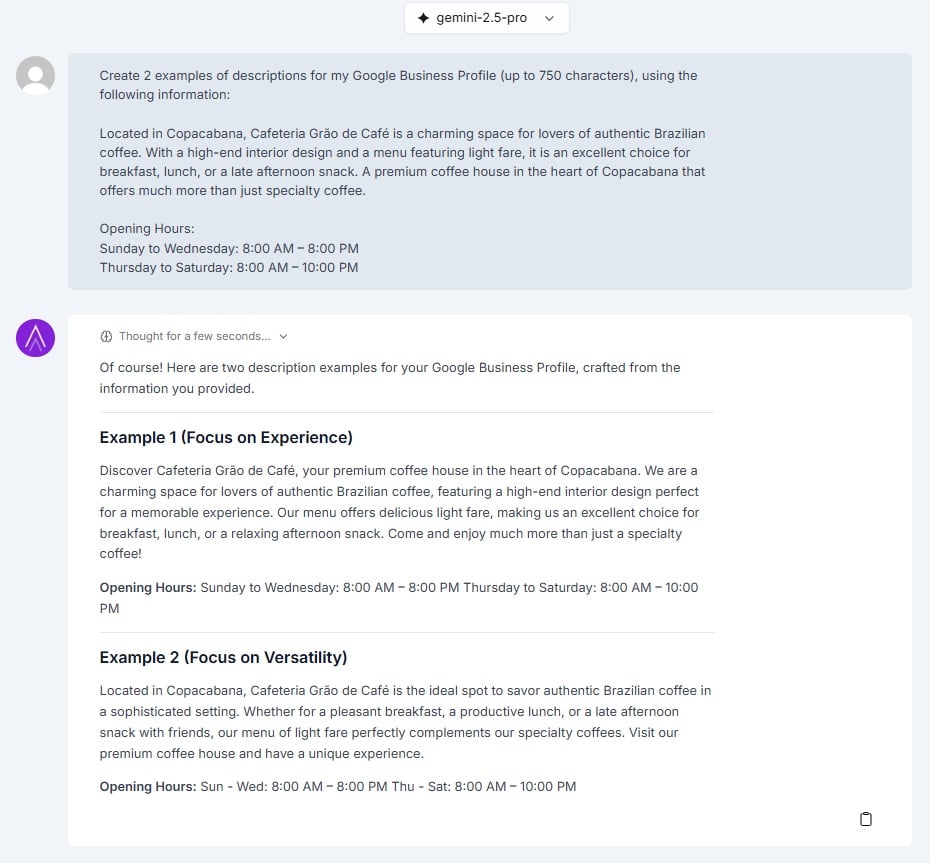
Create an optimized description for my company’s Google Business Profile. Company Name: {Company Name}. Industry: {Industry}. Main services: {Service 1, Service 2}. Address: {Address}. Differentiators: {Differentiator 1, Differentiator 2}.
4. Instagram
Prompt Example:
Suggest a {specify period – weekly, bi-weekly, monthly} editorial calendar for the Instagram profile of a {specify niche}, with {number of posts} posts per week. The goal is to {state the goal of the posts}. My audience consists of {provide audience details}.
5. Google Ads
Prompt Example:
Act as an experienced Google Ads professional. Analyze the following data exported from Google Ads and suggest points for improvement. Group the suggestions by campaign. Google Ads Data: {copy and paste the report or attach the .csv/.xls file}
6. YouTube
Prompt Example:
Niara, act as a YouTube expert and suggest a title, description, and tags for my YouTube video about {detail the video topic}. Take the following into account: My target audience is {provide audience details}. The objective of my video is {state the objective}.
You can also use Niara to write video scripts in seconds to ensure your content is engaging from the first second.
7. E-commerce
Creating content for your e-commerce is a great way to increase your site’s visibility.
Whether on the blog, product pages, or category pages, adding relevant information improves user engagement, retention, and ensures that Google’s bots position your page in the most appropriate search results.
So, don’t underestimate the power of content creation for e-commerce! Use our library to build even more captivating pages and landing pages.
Prompt Example:
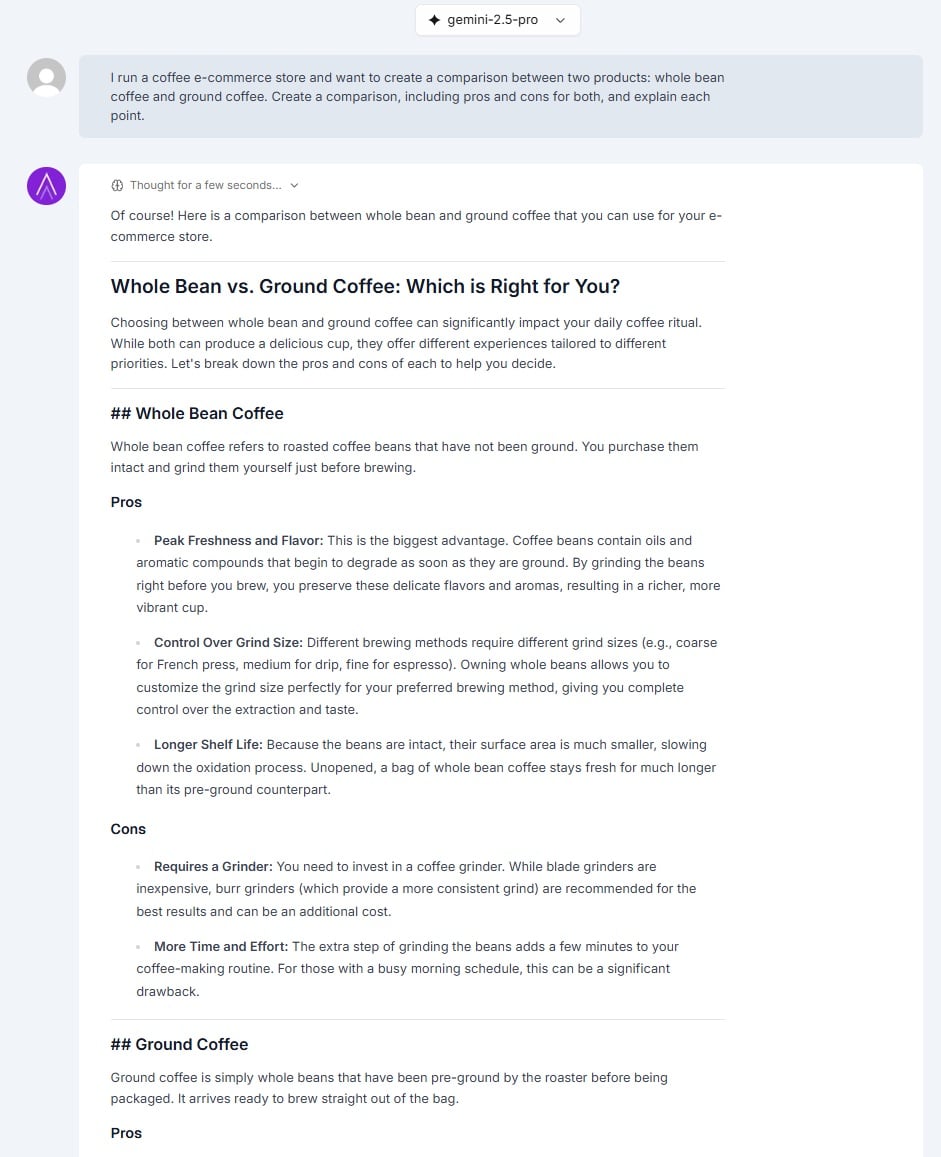
I have a tech e-commerce store and want to create a comparison between two products: {product A} and {product B}. Create a comparison in a table format, with the pros and cons of each, and explain the main features.
8. Link Building
How is your link-building strategy going?
Need help contacting sites related to yours that can help improve your ranking and authority?
You no longer need to rack your brain when creating emails. In just a few clicks, you can create as many emails or press releases as you want, edit, add, or remove information until you get the ideal result.
Prompt Example:
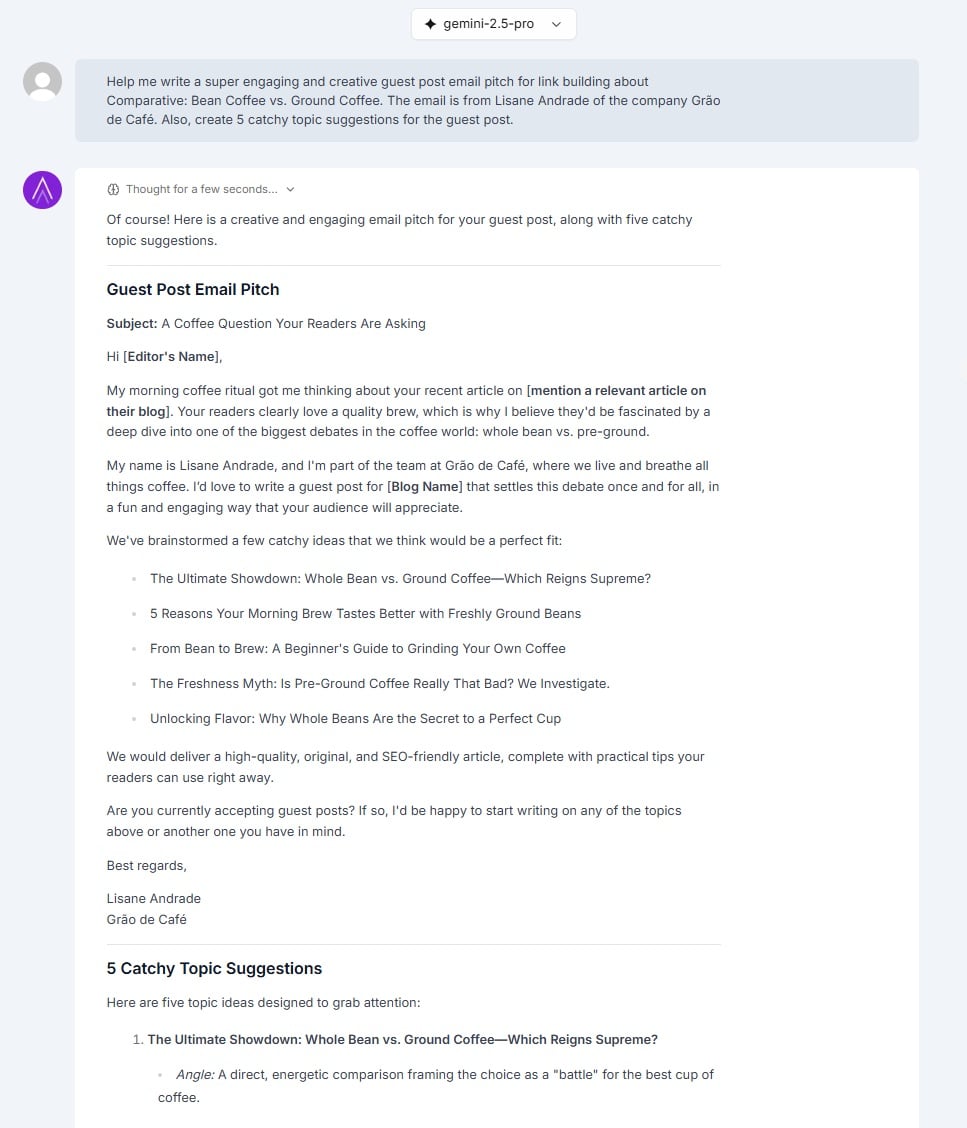
Help me write a super engaging and creative guest post email pitch for link building about {state the topic}. The email is from {your name} of the company {company name}. Also, create 5 catchy topic suggestions for the guest post.
Frequently Asked Questions (FAQ)
1. Is there a cost to use Niara’s Prompt Library? The Prompt Library is integrated into our ChatSEO and is available to all Niara users, including during the 7-day free trial period.
2. How can I customize the prompts for my needs? Customization is key! When you select a prompt, it will appear in the chat with fields in brackets, like [your keyword] or [your audience]. Simply replace this text with your project’s specific details to get highly relevant results. You can also edit, add, or remove parts of the prompt text before sending it.
3. Does Niara’s Prompt Library offer prompts for social media platforms? Yes! We currently have dedicated categories for Instagram, with prompts for creating editorial calendars, post ideas, scripts, captions, and more.
4. Is there a video tutorial on how to use the Prompt Library? Yes! Watch our tutorial that shows a step-by-step guide on how to use the prompts from the library.
5. What are the best practices for using the prompts?
- Be Specific: The more details you provide in the bracketed fields, the better the response will be.
- Test and Refine: Don’t hesitate to run the same prompt with slight variations to see which one generates the best result.
- Combine Prompts: Use one prompt to generate ideas and another to delve deeper into one of them. For example, use one for “Topic Ideas” and then another to “Create a brief” for the chosen topic.
Start Streamlining Your Workflow Today
Our goal is to make your digital marketing workflow increasingly practical and efficient. With the Prompt Library, you save time, eliminate creative blocks, and ensure that your requests to the AI are always strategic and precise.
Ready to transform your digital marketing?
Sign up for Niara, take advantage of the 7-day trial, and explore the full potential of the Prompt Library
