
A content production briefing is a strategic document that serves as a guide for the writer. It contains the objective, target keyword, buyer persona, tone of voice, and the structure (outline) necessary to ensure the final content meets both SEO and business expectations.
Are you looking for a clear and efficient briefing example to guide your content production? You’ve come to the right place. A well-structured document is the foundation of any successful content, whether it’s a blog post, a product description, or a landing page.
We know that starting from scratch can be a challenge. That’s why we’ve prepared 4 practical and detailed briefing examples for different needs. Use them as templates for your projects.
After reviewing the examples, we’ll show you how to use Niara’s AI to create complete briefings like these, analyzing competitors and building your outline up to 70% faster.
Checklist: What should a good content production briefing include?
A complete briefing goes beyond a simple list of topics. It is a strategic document. Use this checklist to make sure nothing is missing from yours:
[ ] Main Objective
[ ] Detailed Buyer Persona
[ ] Primary Keyword (Focus Keyword)
[ ] Secondary Keywords
[ ] Competitor Analysis (Structure and Topics)
[ ] Suggested Outline (H2s, H3s)
[ ] Brand Tone of Voice
[ ] Call to Action (CTA)
[ ] References and Inspiration
[ ] Technical Requirements (Word count, images, etc.)
[ ] Deadline and Owner
4 Ready-to-use content briefing examples
The best way to understand the structure of a good document is by seeing it in practice. Below, we present 4 briefing models created with the help of Niara.
Example 1: Blog Post Briefing
Objective: To educate the audience on “how to organize a wedding,” attract qualified top-of-funnel (TOFU) traffic, and position the brand as an authority in the wedding industry.
Primary Keyword: how to organize a wedding
Target Audience: Engaged couples (ages 25-40) who are starting their wedding planning and feel overwhelmed by the number of tasks. They are looking for a practical checklist and money-saving tips.
Content Structure (Outline):
- H2: Where to start when organizing a wedding?
- H2: Complete Checklist: Step-by-step to organize your big day
- H3: 12 to 9 months before: Define the budget and guest list
- H3: 8 to 6 months before: Choosing the venue and main vendors (catering, photography)
- H3: 5 to 3 months before: Invitations, attire, and decor details
- H3: 2 to 1 month before: RSVP tracking, final fittings, and ceremony rehearsal
- H2: Tips for saving money on wedding planning
- H2: Frequently Asked Questions about event planning
- Call to Action (CTA): “Download our complete wedding planning checklist in PDF!”
Notes: Use an empathetic and encouraging tone of voice. Include 2 to 3 inspirational images per section. Estimated word count: ~1,800 words.
Read more: How to Create Your First High-Performance Article on Niara
Example 2: Product Description Briefing (E-commerce)
Objective: To convert visitors into buyers for the “XYZ Running Shoes,” highlighting benefits and technical features in a persuasive way.
Primary Keyword: men’s cushioned running shoes
Target Audience: Amateur male runners looking for comfortable shoes for 5k to 10k training who value cushioning technology to prevent injuries.
Content Structure (Outline):
- Product Title: XYZ Running Shoes with Impact Cushioning
- Short Description (first paragraph): Summary of key benefits: maximum comfort, impact absorption technology, and modern design for your workouts.
- Benefits List (Bullet Points):
- Gel Cushioning Technology: Protects your joints.
- Breathable Fabric: Keeps your feet dry and comfortable.
- High-Grip Outsole: Safety on different surfaces.
- Lightweight and Flexible: Superior performance while running.
- Technical Specifications: Material, weight, foot strike type, warranty.
- Social Proof: Space for customer reviews and average rating.
- Call to Action (CTA): “Buy Now” and “Add to Cart.”
Read more: Bulk AI Product Description Generator: Scale SEO & Sales in Minutes
Example 3: Category Page Briefing (E-commerce)
Objective: To rank for the term “frost-free refrigerator,” educate consumers on the advantages of this product type, and guide them to the products in the category.
Primary Keyword: frost-free refrigerator
Target Audience: Consumers researching to buy a new fridge but who have doubts about available technologies. They want to understand the difference between “Frost-Free,” “Cycle Defrost,” etc.
Content Structure (Category Text):
- H1: Frost-Free Refrigerators: Best Brands and Deals
- H2: What is a frost-free refrigerator and how does it work?
- H2: What are the advantages of frost-free technology?
- (Paragraph explaining the convenience of never defrosting, better food preservation, and energy efficiency).
- H2: How to choose the ideal frost-free refrigerator for you?
- (Points on capacity, door types, energy consumption, and extra features).
- H2: Browse our Frost-Free Refrigerator models
- (Category product grid).
- Call to Action (CTA): Product buttons (“View Details,” “Buy Now”).
Example 4: Landing Page Briefing (Conversion)
Objective: To convert visitors into leads or buyers for the “Fitness for Busy Women” program, focusing on muscle tone and definition for women with limited time.
Primary Keyword: women’s strength training workout
Target Audience: Women (ages 25-45) with busy routines, seeking aesthetic results (toning) and health, but who feel intimidated by traditional “gym culture” or don’t know where to start.
Landing Page Structure (Outline):
- H1: Get the body you want with just 40 minutes of strength training a day.
- Subheadline (Value Proposition): A proven method for real women who want muscle definition without restrictive diets or hours at the gym.
- Pain Point Section (Storytelling): Do you feel lost at the gym? Tired of generic workouts that don’t bring results? We hear you.
- The Solution (The Product): Program introduction, method pillars (glute/core focused training, nutritional support, and community).
- Social Proof: Video testimonials and “before and after” photos from real students.
- Benefits (Bullet Points):
- Quick and efficient workouts.
- Mobile access wherever you are.
- Straightforward nutritional guide.
- H2 (FAQ): “Do I need equipment?”, “I’m a beginner, is this for me?”, “How long until I see results?”.
- Call to Action (CTA): Highlighted button: “I WANT TO START MY WORKOUT NOW.”
- Notes:
- Language: Avoid excessive physiological jargon; focus on visual and well-being benefits.
- Mental Triggers: Scarcity (limited spots) and social proof are mandatory for this LP.
Discover Content Workflow and create strategic briefings in less time
Manually analyzing every SEO checklist item for every piece of content is the main bottleneck for agencies and marketing teams. In the past, we were forced to visit every organic competitor one by one to dissect their pages and understand their “success formula.” Only after hours of analysis could we structure our own page.
Niara’s Content Workflow solves this by centralizing all that intelligence. What used to take 1 or 2 hours of research is now delivered in seconds. You stop being a “data copier” and become a content strategist, focusing on what really matters: your content’s competitive edge.
Our tool automates the most laborious part: competitor analysis and outline structuring.
Step 1: Strategic Definition and Context
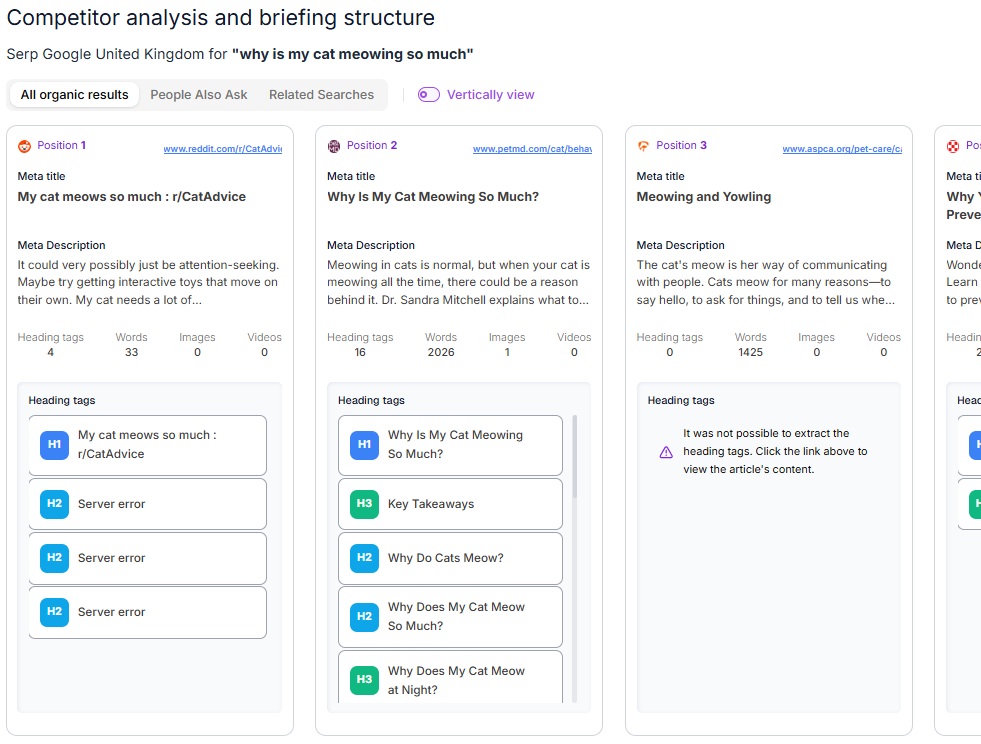
The first mistake many professionals make is skipping the context. In Content Worklow, you start by entering your focus keyword, but the difference lies in how you set the stage.
On the initial screen, you can add your content’s objective and define the country and language so Niara analyzes the exact SERP your audience sees.
Step 2: Competitor Analysis
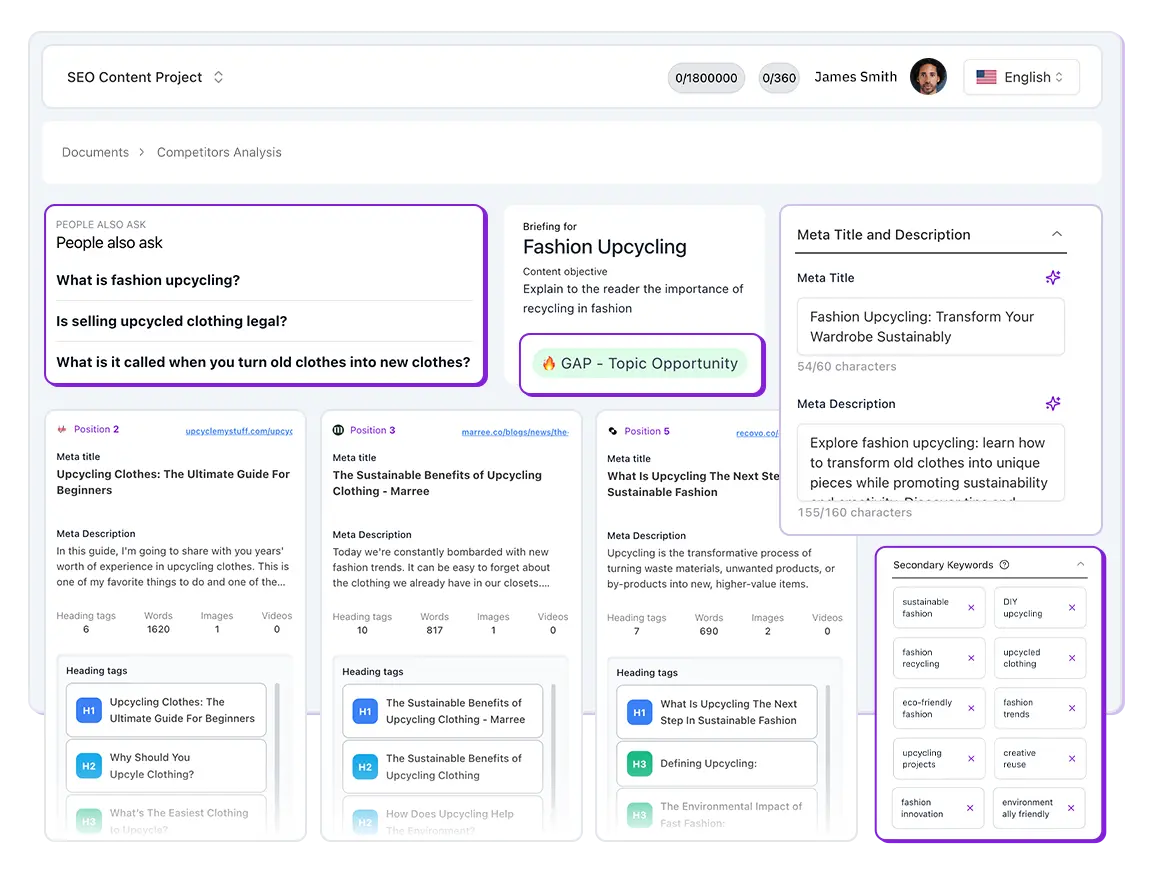
Niara doesn’t “guess” what should be written; it performs an X-ray of Google’s top organic results.
- Heading tags: See how ranking leaders structured their H1, H2, and H3. This allows you to identify gaps: what did they miss that you can answer?
- People Also Ask (PAA) and related searches: The briefing automatically imports real user questions. Integrating this info is vital to align your text with search intent.
- Volume Benchmark: Analyze the average word count of competitors to understand the effort needed to outrank them.
Step 3: Outline Structuring and Full Briefing
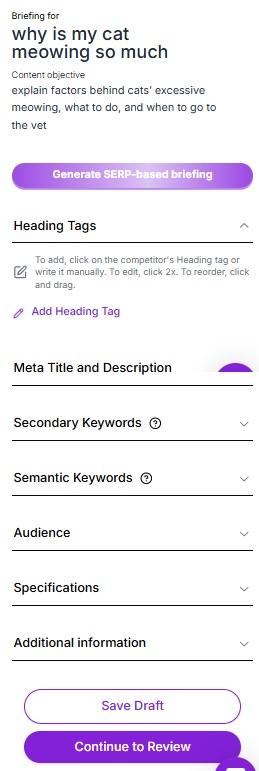
With SERP data and brand voice integrated, Niara organizes the logical structure of the text, including:
- Full outline;
- Snippet suggestions (titles and meta descriptions);
- Related keywords.
Step 4: From Briefing to Content Production in one click
Unlike tools that stop at the outline, in Content Workflow, you have the option to move directly to creation.
The briefing serves as the “skeleton” Niara uses to write the initial draft, respecting every defined H2 and H3, saving hours of typing and ensuring the initial strategic plan is followed to the letter.
Tutorial: How to create a content briefing up to 70% faster
Check out below how to create briefings with Niara and achieve more efficiency and results with your content!
Additional Niara features to power up your briefings
To create an even more powerful briefing, you can use other Niara features to fuel your document:
- Brand Guidelines: Set up your buyer persona, tone of voice, and specific project rules once. Niara automatically applies your preferences to all generations.
- Keyword Generator: Find dozens of secondary and long-tail terms.
- ChatSEO: Use prompts to deepen buyer persona analysis.
- Tasks: Use trained agents to understand your audience or create topic clusters.
- Search Analytics: Monitor the real impact of your produced content, tracking growth in clicks and impressions.
Automate SEO content briefing creation with Niara
Having good briefing examples at hand is the first step to optimizing your strategy. The second is automating their creation. By eliminating hours of manual work, you free up time for what really matters: strategy.
Stop starting from scratch with every new piece of content. Use our templates as inspiration and try Niara for free to create your own strategic documents in minutes. No credit card required for the trial! 😉
Enjoy!
Frequently Asked Questions (FAQ)
What is a content briefing in one sentence?
It is a document that centralizes all guidelines and objectives of a content project to guide the creative team.
Do I need to create a briefing for every type of content?
It is highly recommended. Even for simple content, a mini-briefing ensures alignment and saves time on revisions.
How detailed does a briefing need to be?
Detailed enough so the content creator can work independently without doubts about the goals and structure.
How can I sign up to test Niara’s Content Workflow?
It’s easy! New users get a 7-day free trial to test Content Workflow and all other features. Just sign up on our website. No credit card required.