To optimize for Google AI Overviews (AIO) effectively, you must shift your focus from simply ranking for keywords to becoming a verified source of truth for Google’s generative model. Your content needs to be technically accessible, semantically rich, and formatted in a way that an AI can easily extract and summarize.
By following the steps in this guide, you will learn how to use Niara to find exactly what Google wants to see and how to format your expertise so it stands out at the top of the page.
TL;DR: the 5-minute strategy to optimize for Google AI Overviews effectively with Niara
Follow this simple workflow to close the AIO gap and win AI citations with Niara:
- Identify the gap: use Search Analytics to find pages with high average positions but falling impressions. These are your best candidates for AI Overview optimization.
- Run the diagnostic: paste your URL into Google AI Mode Insights. Set the content type and search intent to get a report on missing topics and semantic gaps.
- Analyze competitors: run the same diagnostic for your top organic competitors. Use ChatSEO to compare the reports and find unique “untapped” topics that neither you nor your competitors have covered.
- Update the content: Use Content Workflow for major rewrites or ChatSEO (with Web Search on) for targeted updates. Focus on adding the missing pieces identified in the gap analysis.
- Format for extraction: apply chunking (short paragraphs) and high-signal sentences (direct answers first). Ensure your Schema Markup is active so bots can read your facts directly from the code.
- Verify technical health: use Niara’s Site Audit to ensure your pages load fast and are easy for Google to crawl. Follow the step-by-step guides for any urgent technical fixes.
- Final quality check: paste your updated text back into ChatSEO and ask if the new version successfully covers all the audience’s needs and AI-friendly formatting rules. You’re set!
How to use AI Mode Insights to audit your content considering AI assistents?
Auditing for generative search requires a shift to how well a model can parse your data. An AI Overview visibility audit focuses on whether your page provides clear, extractable answers for the Google AI Overview. Niara’s AI Mode Insights evaluates your content, identifying the semantic signals and entity-based SEO needed to win the top summary.
1. Spotting the right pages to optimize
If you aren’t sure which pages need work, start by using Niara’s Search Analytics to track performance drops over your chosen timeframe. For the best results, look at your data from the past three months, focusing on impressions and average position.
Think of impressions as a way to measure how often you actually appear in front of users. Your average position, on the other hand, shows how much Google trusts your site as an authority.
Finding a high average position paired with falling impressions points to the “AIO gap.” This happens when Google views you as an expert, but your content isn’t formatted for the AI to pick it up as a source. Using AIM Insights for technical optimization helps you reclaim that space and turn your authority into actual traffic.
You should also keep a close eye on your most important business pages if both their average position and impressions are lower than they should be.
Use the filters in Search Analytics to pull a list of URLs that are ready for a refresh.
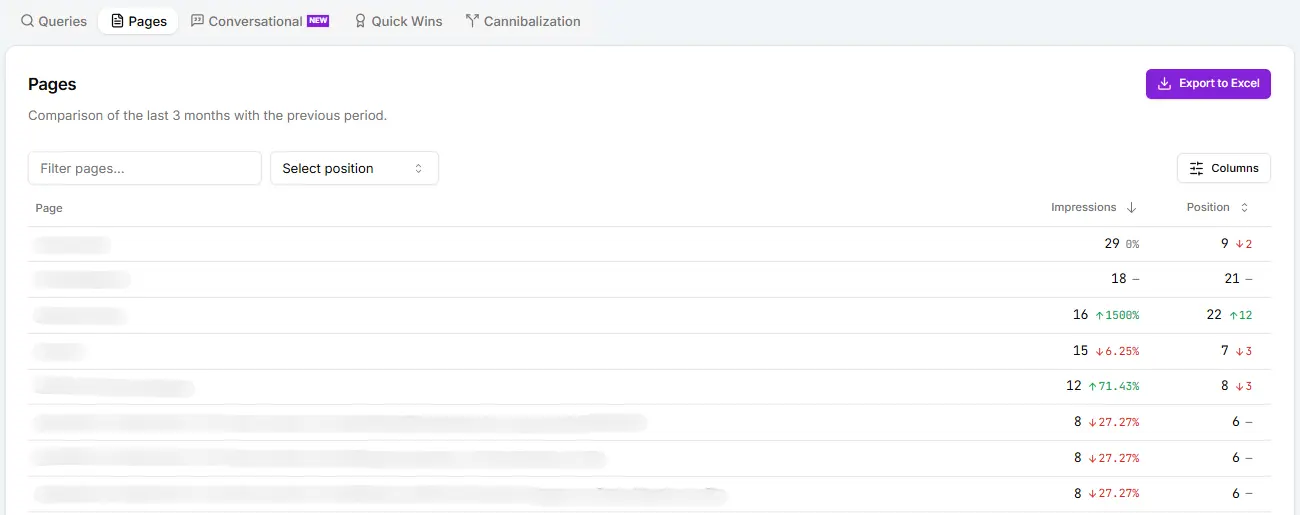
AI Overview checklist:
- Did I filter for pages with an average position under 10?
- Are impressions for these pages declining month-over-month?
- Is this page a high-priority business asset (money page)?
2. Checking page quality for AI Overviews
You can handle AIO optimization directly within Niara’s Google AI Mode Insights. Simply paste your URL and select the content type, such as a blog post, landing page, product page, or homepage. You also need to set the search intent. Think of intent as the user’s main goal: are they looking to buy, learn something, or find a specific website?
This tool checks how well your page follows Google’s official documentation for AI Mode and AI Overviews. By combining these guidelines with an analysis of your specific content, AIM Insights provides a final report that includes:
- Sub-questions already answered;
- New topic opportunities you might have missed;
- Extra tips focused on optimization and user experience.
You’ll get something like that:
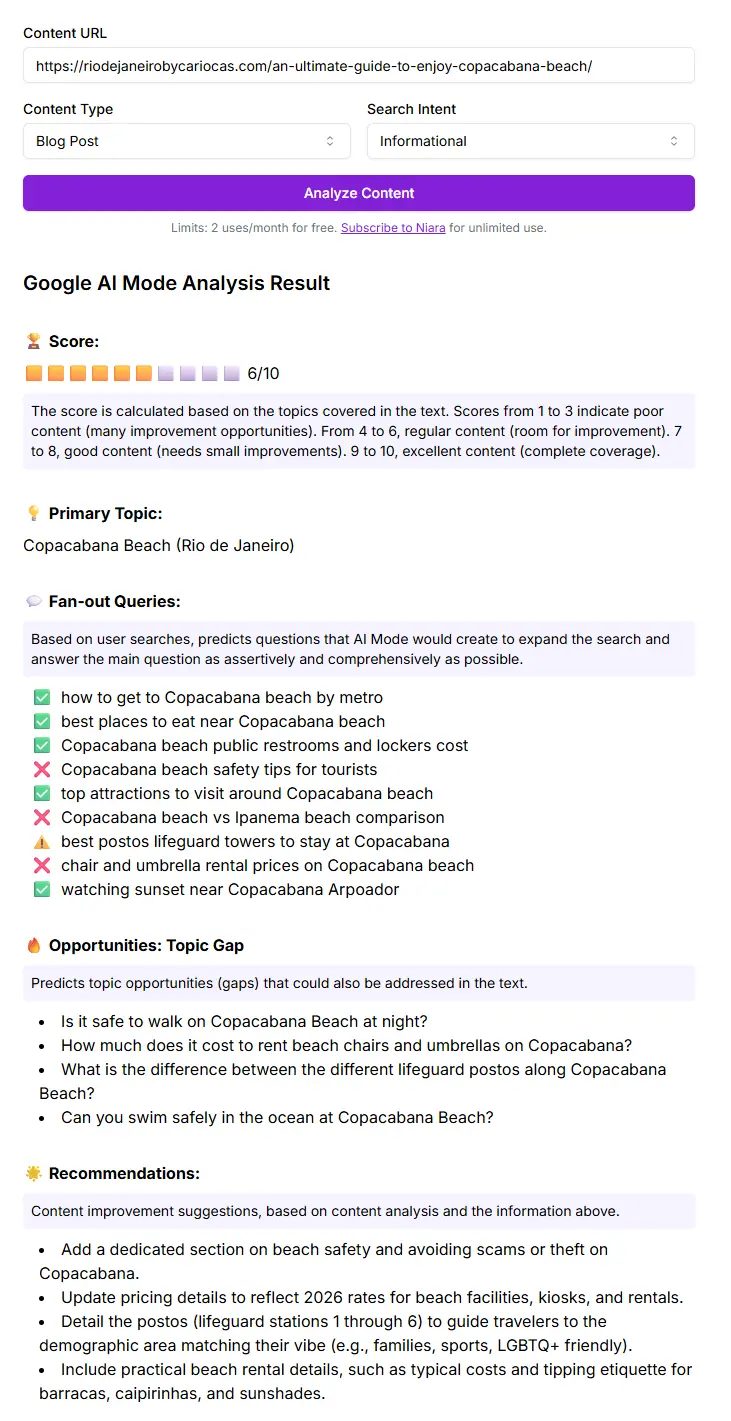
Once you have this report, copy the results and paste them into ChatSEO. Ask Niara for help with the specific points you find most useful for that page. Keep in mind that you are the expert here. Your judgment is what leads to a successful update.
You don’t have to change everything: you decide which steps will make the experience better for your visitors.
Quality audit checklist:
- Did I run the AIM Insights diagnostic for the specific search intent?
- Have I identified at least 3 sub-questions that are currently missing from my text?
- Did I ask ChatSEO to prioritize the updates based on user value?
3. Checking the competition with AI Mode Insights
Another way to use AIM Insights is to look at what your competitors are doing well and find gaps they’ve missed. This helps you add more value to your own content.
For example, imagine an article for tourists about “how to get to Copacabana beach in Rio de Janeiro”. You can analyze your page along with two organic competitors that already hold top spots in Google search results.
Take the information from all three reports and share it with Niara in ChatSEO:
Niara, here is the Google AI Mode Insights diagnostic for my website’s article and two organic competitors.
Using tables, please outline the following for me:
- Shared topics across all pages
- Content gaps in my article compared to competitors
- Untapped content gaps (topics not covered in any of the texts that are important to my audience)
Recommendations and ideas reported by the diagnostics to improve the user experience on my site
Niara answered us like this:
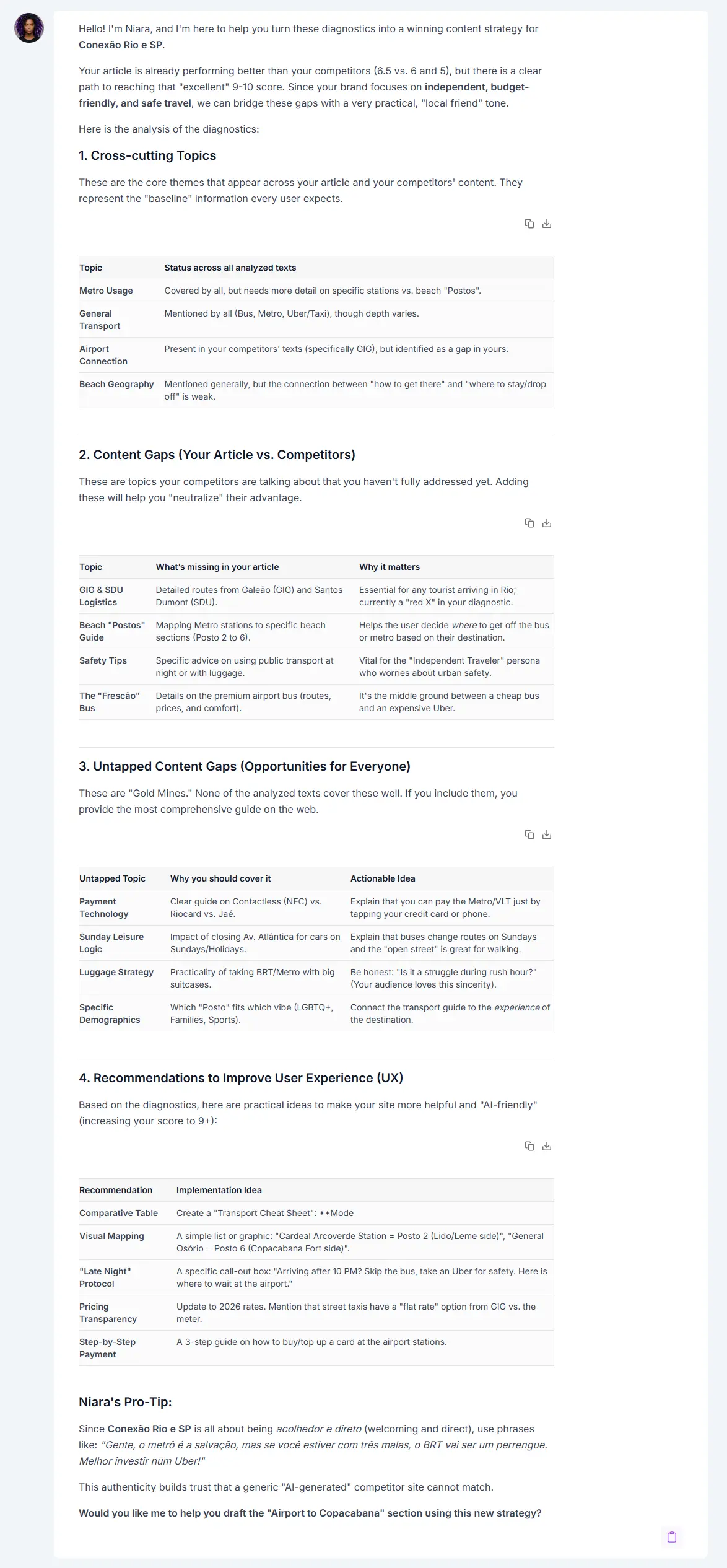
Reviewing your competitors is a big part of the optimization process. If they are on the first page, Google already sees something useful in their content. Taking this broader look beyond your own site helps you build a stronger, more reliable piece of content that fully meets your audience’s needs.
Competitor gap checklist:
- Did I analyze at least two organic competitors appearing in the AIO?
- Did I identify untapped topics that neither my site nor my competitors cover?
- Is there a unique data point or perspective I can add to stand out?
4. Improving your content with Niara
To get the best results, you can take two different paths within Niara:
- If the page feels very thin or incomplete, it’s worth rewriting it using the Content Workflow.
- If you only need small, specific updates, ChatSEO is the right tool for the job.
For quick updates, we recommend turning on the “Web Search” feature, pasting your URL, and using a prompt like this:
Here’s the article in question that was analyzed by AIM Insights: [paste your URL]
Based on the second part of your analysis (2. Content Gaps (Your Article vs. Competitors)), I’d now like your help figuring out the best places in the text to add each new piece of information. Please specify where to insert them, the reasoning behind your recommendation, and the best format to use (e.g., a bulleted list, a table, or running text).
The goal is to improve your content piece by piece, focusing on what your audience actually wants to read. Stay in the same chat so Niara can keep track of the recommendations and the style you’ve already set.
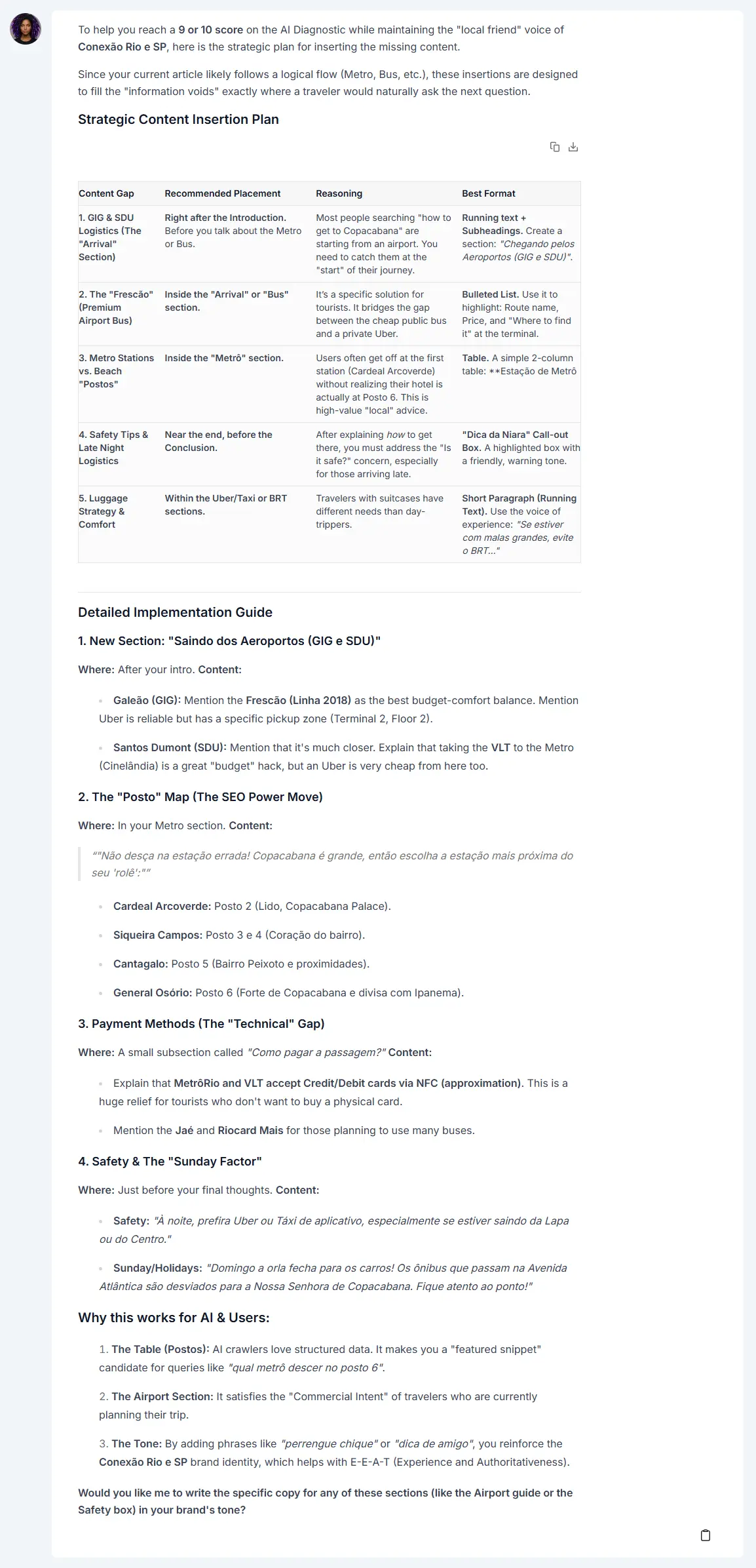
What makes this work so well is that, in both cases, Niara uses your Brand Guide to match your exact tone of voice. This cuts down on edits and helps you get your content live much faster.
Content update checklist:
- Did I use ChatSEO with “Web Search” on to get the most current context?
- Are the new sections placed logically within the existing flow?
- Is the updated text following my Brand Guide rules?
5. Formatting your text for AI Overviews
When you optimize content for AI, following these writing practices will help your results:
- Chunking: break your content into short paragraphs that focus on a single idea. This makes it easier for the AI to pull out the right answer. Each paragraph should make sense on its own, even if read apart from the rest of the page.
- High-signal paragraphs: the first sentence of every section should give a direct answer to the heading (H2 or H3). Use the inverted pyramid logic: lead with the conclusion and follow up with the details.
- Factual density: swap out empty adjectives (like “amazing strategy”) for real data (like “a 22% increase in conversions”).
- Tables and lists: turn comparisons, prices, and step-by-step guides into tables or lists. This removes confusion and helps the AI summarize the information quickly.
To show how this works in practice, take a look into examaples of high-signal snippets that Google is far more likely to feature in an AI Overview:
| Feature | Before | After |
|---|---|---|
| Structure | “It’s not just about keywords, it’s about the landscape of your content. To improve, you should explore various ways to bolster your rankings and foster growth.” | To optimize for AI Overviews, focus on factual density. Direct answers and data-backed claims increase your chances of being cited as a primary source. |
| Clarity | “In this intricate tapestry of digital marketing, it is crucial and essential to meticulously enhance your site’s speed for a vibrant user experience.” | Site speed is a direct ranking factor for AI summaries. Pages that load in under 2 seconds provide the technical stability needed for Google’s crawler to parse text. |
| Data | “Using our tool will showcase a significant and valuable improvement in how your pages are seen by search engines.” | Niara users save an average of 10 hours per week by automating gap analysis and content formatting for generative search. |
Once your text is updated, paste it back into ChatSEO and ask: “Does this version provide a direct answer in the first 40 words of each section? Is there any fluff I can cut to make the facts stand out?”. This final check ensures your content is lean, authoritative, and ready to win the top spot.
Also read
- How to optimize your website for AI answer engines: A practical workflow to get citations (Niara POV)
- Information gain SEO: how to survive the generative search era by adding value, not just noise
- Why competitors are in AI Overviews and you’re not?
Extra orientations: technical SEO tactics for AI Overviews
A strong technical foundation is what allows a Google AI Overview to find and use your content. Think of it as making sure the doors to your website are open and the lights are on so that Google’s bots can read your pages without getting lost or confused.
Making your site easy to find and read
Before you can appear in AI results, Google needs to know your page exists. This means your site needs to be easy to navigate. If a page is hidden or not linked to any other part of your site, the AI will likely miss it. Using a simple and clear menu helps bots discover your content clusters (groups of related topics), ensuring they see all the great information you’ve written.
Speed and clean pages
Even though AI models are fast, they still need to “see” your content quickly to process it. If your site takes too long to load, AI bots may time out and miss important parts of your page. Keeping your site fast and the layout stable ensures that every part of your text is ready for the AI to pick it up and show it to users.
Organizing your ideas like a book
Think of your page structure like a book’s table of contents. Using clear headings for your main topic and subtopics helps with entity-based SEO. It tells the AI exactly how your ideas are connected. This organized content format for AI summaries makes it much easier for a bot to pull out a specific answer to a user’s question. Instead of just making text bold, using proper headings creates a map that the AI can follow.
Giving the AI a “cheat sheet” with schema
The most important thing to know is that AI bots read your website’s code before they see the actual design. To help them out, you can use structured data (schema). This is a piece of code that tells the AI exactly what is on the page, like a product with a FAQ section or a how-to article.
When you have this set up, the AI doesn’t have to guess, because it can read the code and immediately understand your content.
Technical health checklist:
- Did I run a Niara Site Audit to check for crawl errors?
- Is my Schema Markup (FAQ or Article) active and error-free?
- Does the page load in under 2.5 seconds (Largest Contentful Paint)?
Technical SEO doesn’t need to be difficult. Niara also helps you with that
You don’t need to be an engineer to keep your website in top shape. Niara’s Site Audit tool was built to make technical SEO easy to understand, even if you’ve never looked at code before. It gathers all the important data about how Google sees and loads your pages into one simple dashboard.
Instead of jumping between different complex platforms, you get a clear view of which pages need your attention. Niara identifies exactly what is wrong and tells you how urgent each fix is.
The best part is how it guides you to the finish line. Niara clearly shows who should handle each task, and if you are working solo, you can chat with it to get a step-by-step guide to solve the problem yourself.
Unlike other general web tools, Niara is built specifically for SEO. This means every insight and recommendation is focused on one goal: making your content easier for both users and AI to find and trust.
Speed up your results with a specialized SEO partner
The way people find information is changing, and your strategy needs to keep up. Using a specialized partner like Niara makes this transition much faster. Our platform handles the complex work of scanning your site and comparing your content to competitors, giving you a clear list of improvements to make.
You can start improving your site right now.
Niara is a freemium platform, which means tools like AI Mode Insights and our Structured Data Generator are available for you to use for free.
To get the most out of our features, sign up for a 7-day free trial. This gives you full access to our Content Workflow, Search Analytics, and Site Audit so you can see the results for yourself. Try it now!