
To ensure your content reaches the top positions in Google’s search results, it’s essential to optimize every SEO element: title, keywords, heading tags, and other attributes. But there are many details, and having an assistant at these times is invaluable, right? To tell you how optimized your content is and what you can still improve. To help you with this task, the Content Score will guide you to optimization. All the way to 100! This way, you can create and optimize your texts quickly and efficiently. In this article, we’ll explain how to use this tool and how to get a good score.
What is the Content Score?
The Content Score is a feature of the Content Creator and is essential for any SEO professional, acting as a true ally in content creation and optimization. It analyzes, in real-time, several critical factors to ensure your text is aligned with the best SEO practices. The score is displayed in the Content Creator’s sidebar and is categorized into three distinct levels:
- Below 35: low-quality content
- From 35 to 70: medium-quality content
- Above 70: high-quality content
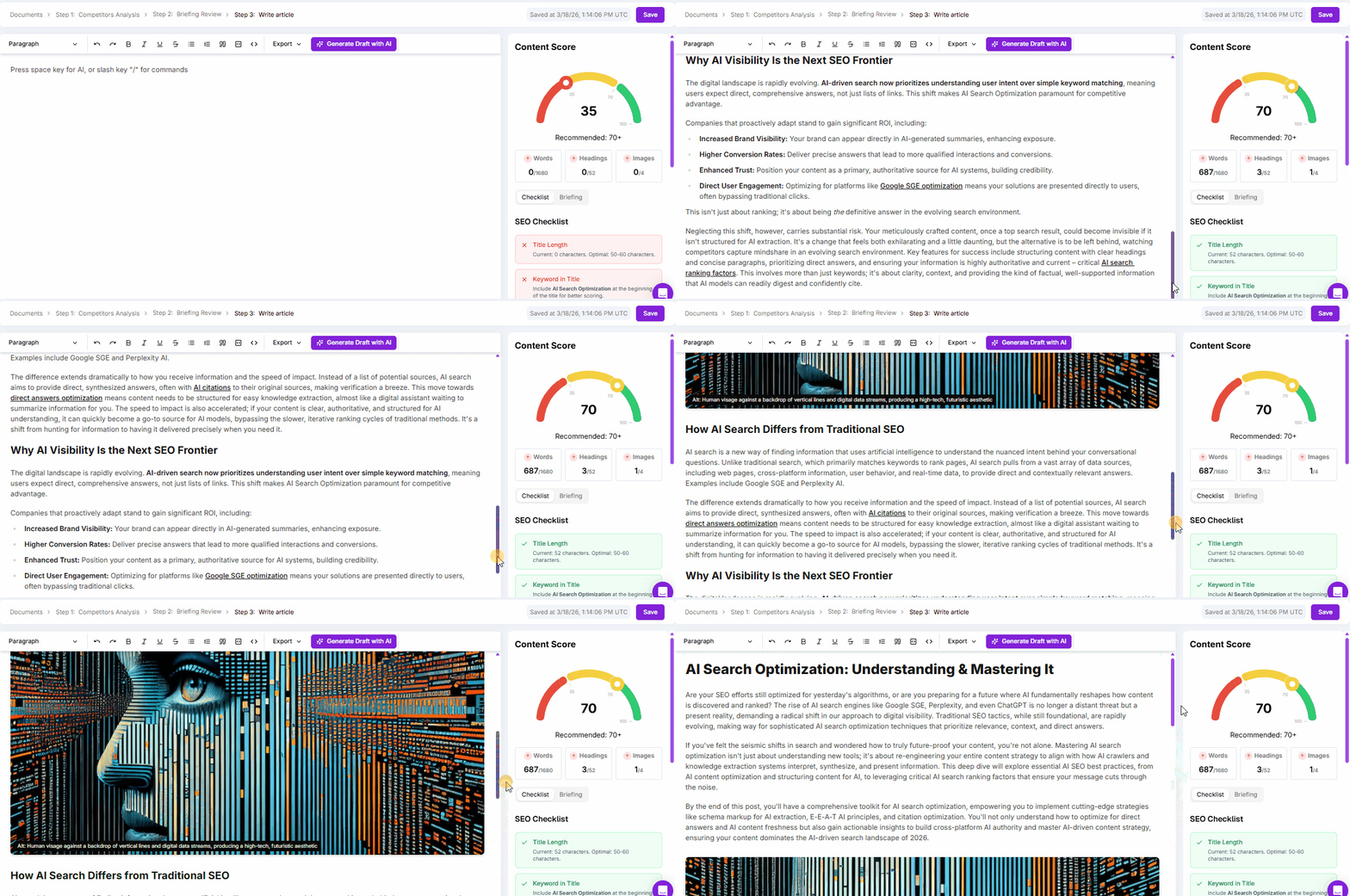
The Content Score helps you quickly identify the strengths and weaknesses of your content, allowing for precise and efficient adjustments to improve its performance in search results.
Content Score Checklist
We use data from the Content Workflow—such as word count, heading tags, and keywords—to feed the AI and the Content Score, ensuring that the content is generated with the correct context and SEO best practices. Therefore, create a good content brief! In the Content Score, Niara displays a list of items that should be optimized to improve your content’s SEO. Below are the criteria and their respective importance levels, followed by an explanation of how to optimize each item.
| Criterion | Importance |
|---|---|
| Word count | High |
| Heading tag structure | High |
| Number of videos | Medium |
| Heading tag 1 character count | Medium |
| Meta title character count | Medium |
| Meta description character count | Low |
| Main keyword at the beginning of Heading tag 1 | Medium |
| Main keyword at the beginning of the meta title | High |
| Main keyword in the meta description | Low |
| Number of images | High |
Step-by-Step Guide to Getting a Good Content Score
1. Word Count
For the score, we consider the word count you defined in the SEO Briefing. Well-developed content can increase time on page and decrease the bounce rate.
2. Heading Tag Structure
Use a well-defined heading structure:
- Only one H1
- At least two H2s
- At least three H3s (this is a recommendation, we do not score this item in the Content Score)
A well-organized heading structure facilitates reading and understanding for both users and search engines. This helps in crawling and indexing the page, improving SEO.
3. Meta Title and Meta Description
Ensure your meta title is between 50 and 63 characters and your meta description is between 140 and 160 characters. Titles and descriptions within these limits are more likely to be displayed correctly in search results, increasing the click-through rate (CTR).
4. Use of Images and Videos
Add the number of images and videos as specified in the SEO Briefing, and include the alt attribute in the images. Images and videos make the content more attractive and engaging, increasing time on page. The image’s alt attribute improves accessibility and helps search engines understand what the images are about, contributing to SEO. Well-optimized images can appear in Google Images and also result in more visits to your site.
5. Keywords
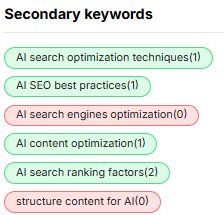
Include the main keyword at the beginning of the meta title and, preferably, also in the heading tag 1. Use secondary keywords naturally throughout the text. The presence of keywords in strategic places helps search engines understand the relevance of your content. Secondary keywords will appear on the right side of the screen and will change from red to green when inserted exactly as they are in the content.
6. Internal and External Links
Add relevant internal links to other pages on your site and external links to authoritative sources. Internal links help distribute page authority and facilitate user navigation, while external links to reliable sources increase the credibility of your content.
7. Readability
Write clearly and directly, using short sentences and well-structured paragraphs. Easy-to-read content improves the user experience, reducing the bounce rate and increasing time on page.
What can harm your content’s performance?
Google has several algorithms to evaluate the quality of content displayed on the results page. Here are some factors that can harm your content’s performance in the search engine:
- Excessive keywords in the content (keyword stuffing);
- Low-quality content;
- Lack of originality (no copying and pasting from competitors or AI);
- Outdated content with incorrect or irrelevant information, decreasing user trust and site authority;
- Ignoring Search Intent;
- Heavy, unoptimized images;
Remember, content optimization is an ongoing journey. Use the Content Score from the Content Creator to constantly evaluate and improve your SEO strategy, ensuring your content is always at the top of the search results. Create your Niara account today and test the Content Creator! Take advantage of the 7 free days to see how Niara can transform your SEO and Content process.
FAQ (Frequently Asked Questions)
What is an SEO Content Score and why does it matter?
It’s a score that summarizes, in real-time, how well your text aligns with essential SEO criteria (structure, term presence, meta tags, media, etc.). It matters because it reduces guesswork: you can quickly see what’s missing to compete better on the SERP and can optimize with focus and consistency.
Does a Content Score of 100 guarantee the first position on Google?
No, it doesn’t. A high score indicates that the content meets important on-page requirements well, but ranking also depends on competition, domain authority, search intent, the actual quality of the text, backlinks, page experience (Core Web Vitals), site history, and SERP context. Think of 100 as “hygiene and completeness,” not a promise of #1.
What’s the difference between “optimizing for the Content Score” and “optimizing for the user”?
In practice, one should reinforce the other. The Content Score guides structural elements and relevance signals, while optimizing for the user requires clarity, examples, depth, objective language, and a direct response to their intent. If you aim for 100 by “forcing” keywords and adding fluff, the text might lose its usefulness and perform worse even with a high score.
How many words do I need to reach 100?
It depends on the brief and the standard for the topic/SERP. The ideal is to hit the range defined in the SEO Briefing and, most importantly, cover the topic completely (subtopics, examples, objections, and context). For some topics, 900 words are enough; for others, 2,000+ is the competitive minimum.
Do heading tags really affect SEO or are they just for organization?
They affect it indirectly and quite significantly. A clean hierarchy (one H1, well-distributed H2s, H3s for detail) improves scannability, helps Google understand the subject by sections, and facilitates matching with different search variations. For the user, it reduces friction and increases time on page.
Are meta titles and meta descriptions still worth it, even if they aren’t direct ranking factors?
Yes, because they influence CTR and the user’s expectation of the click. A strong title and a well-written description increase qualified clicks and reduce pogo-sticking (quickly returning to the SERP). Additionally, a well-crafted title helps to clearly “anchor” the main topic.
How can I use keywords without falling into “keyword stuffing”?
Use the main keyword in strategic places (H1 and the beginning of the title, when it makes sense) and work in secondary keywords as natural variations of the topic, distributed throughout the text. If the text reads artificially, you’ve gone too far. The rule of thumb is: if you read it aloud and it sounds repetitive, adjust it.
