
For the SEO professional seeking not just data, but actionable insights, the routine of analyzing Google Search Console (GSC) can often feel like an arduous journey. The difficulty in identifying the real intent behind keywords, the need to manipulate complex regular expressions, and the limitation of historical data are common obstacles in the quest for effective optimizations.
At Niara, we understand this frustration. That’s why our Search Analytics, which offers up to five times more data than GSC, has just been updated with new advanced filters for search intent and average position, plus a custom date filter.
More Data with Search Analytics
Before we dive into the new features, here’s what Niara’s Search Analytics already offered to supercharge your analysis:
- Expanded view with 5x more data than GSC: Access clicks, impressions, CTR, and average position for up to 5,000 terms and pages, providing a much more complete picture of your organic traffic.
- Quick Identification of “Quick Wins”: Terms with high potential (many impressions and low CTR) for optimizations that deliver fast results.
- Keyword Cannibalization: Detect pages that are competing against each other in search results, allowing for strategic actions to consolidate your rankings.
- Conversational Analytics: Chat with your GSC data directly in ChatSEO!
Now, we’re elevating this experience with features designed to save you time and deepen your understanding of your audience’s behavior.
The One-Click Revolution: Search Intent and Average Position Filters
No more juggling regex or manipulating complex spreadsheets to identify the positioning of your keywords and pages in Google’s results! With Niara, you can now filter in a simple and direct way.
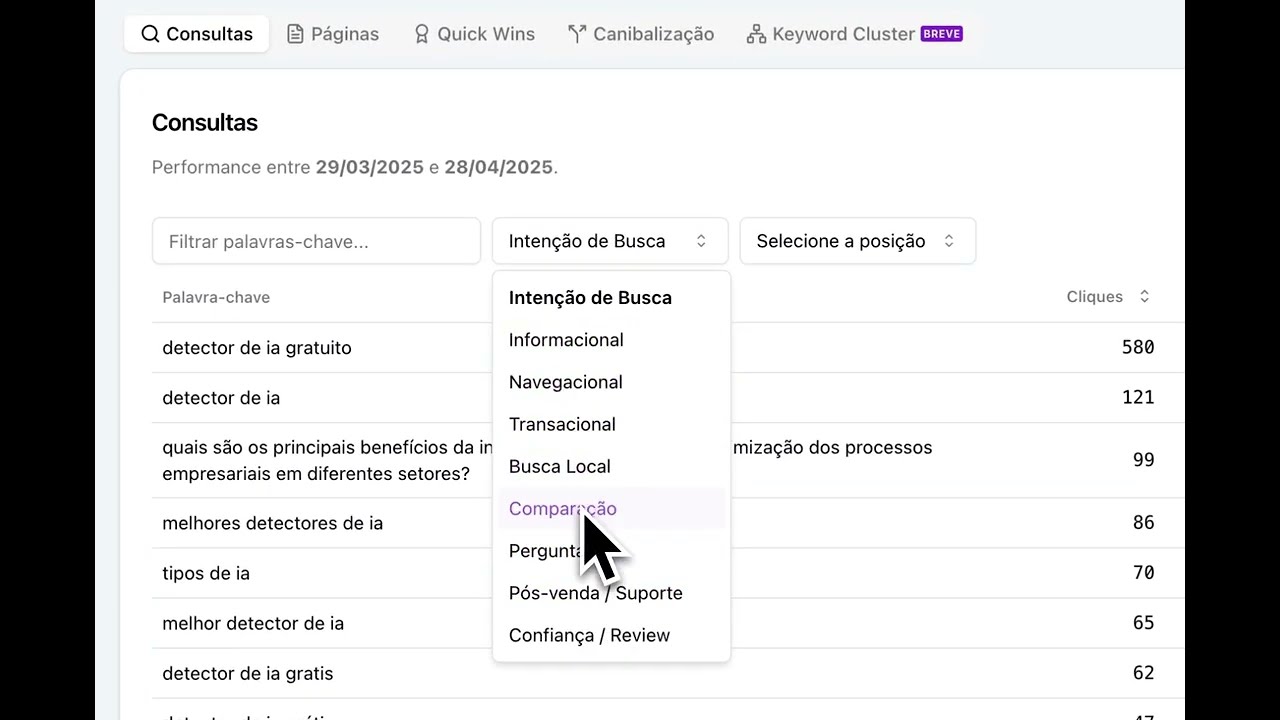
Search Intent Filters
Understand what motivates your audience’s searches and create relevant content.
Below are the search intent categories you can quickly visualize with Niara:
- Informational: Users looking to learn or find information on specific topics. Examples include “how to,” “what is,” “tips,” “best,” “guide.”
- Navigational: Users familiar with a specific brand or website trying to find it directly. Examples include “official site,” “login,” “sign in,” and “open app.”
- Transactional: Users with a clear intention to make a purchase or take a specific action. Frequent terms are “buy,” “price,” “discount,” “offer,” or “sign up.”
- Local Search: Users looking for businesses or services in specific geographic areas; they often contain terms like “[service] near me” or “[business] in [city].”
- Comparison: Users evaluating different options before making a final decision; keywords like “vs,” “compare,” or “alternatives.”
- Questions: Users asking direct questions seeking specific answers; examples include “who,” “what,” “where,” etc.
- Post-Purchase / Support: Users looking for information after purchasing a product; examples include “[product] support” or “track [company] order.”
- Trust / Review: Users looking for opinions about products before the final decision; examples like “is [product] legit”…
This granularity allows you to align your content with the customer’s stage in their journey.
💡 And for those who love a good regex (we get it!), you can still create your own custom filters. Just type your keywords separated by a | (e.g., free|no cost) and you’re all set!
Average Position Filters for Keywords and Pages
The average position in the SERP is a key indicator of your site’s visibility on Google. The higher you rank, the better your brand exposure, click-through rate, and conversions will be.
With the new filter, you can analyze the performance of your terms and pages in specific ranges:
- Positions 1-10: Where the majority of clicks happen.
- Positions 11-20: Opportunities to optimize and quickly reach the first page.
- Positions 21-30: Terms needing a deeper strategic review.
- Positions 31-40: Terms needing a deeper strategic review.
This allows you to prioritize efforts where they will have the greatest impact.
Custom Date Filters
Understanding how your performance evolves over time is crucial for identifying trends and evaluating the impact of your SEO actions.
With our new custom filter, you can choose any time range up to 16 months and get a complete historical view of your performance.
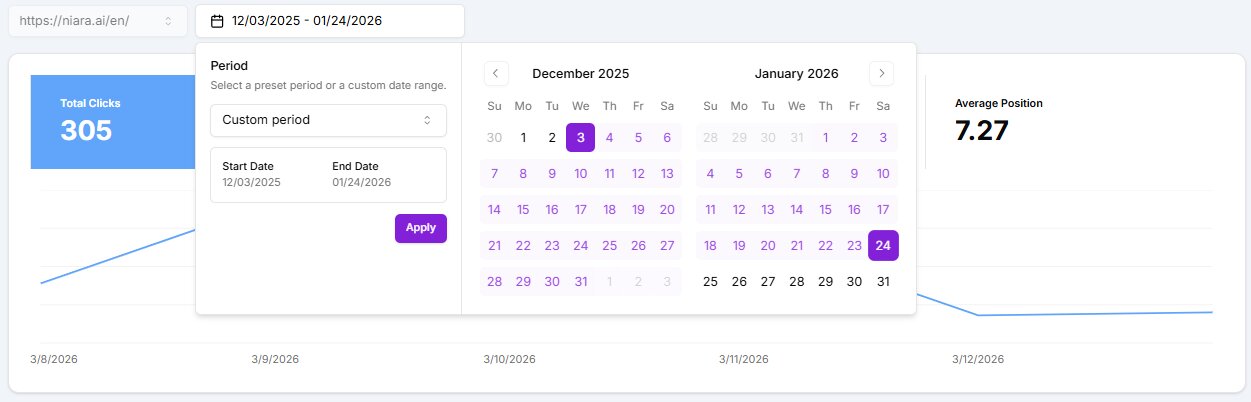
These updates were designed to give you more speed and efficiency in your analysis, without the complexity and limitations of Google Search Console. Understanding the “why” behind the numbers has never been easier!
Subscribe to Search Analytics now and discover an intelligent and efficient way to understand your audience and optimize your organic performance
