Recently, an update to Google’s official documentation sparked a lot of conversation (and even some confusion) in the SEO community: Googlebot now explicitly states that it crawls (downloads) only the first 2MB of HTML files and other supported formats (with the exception of PDFs, which have a higher limit).
For many professionals used to larger numbers, this change raised a red flag. Has Google stopped reading my site? Is my footer content being ignored?
In this article, we will demystify this update, explain technically what counts toward this limit, and, of course, how to ensure your site continues to perform well.
What does the new Google documentation say?
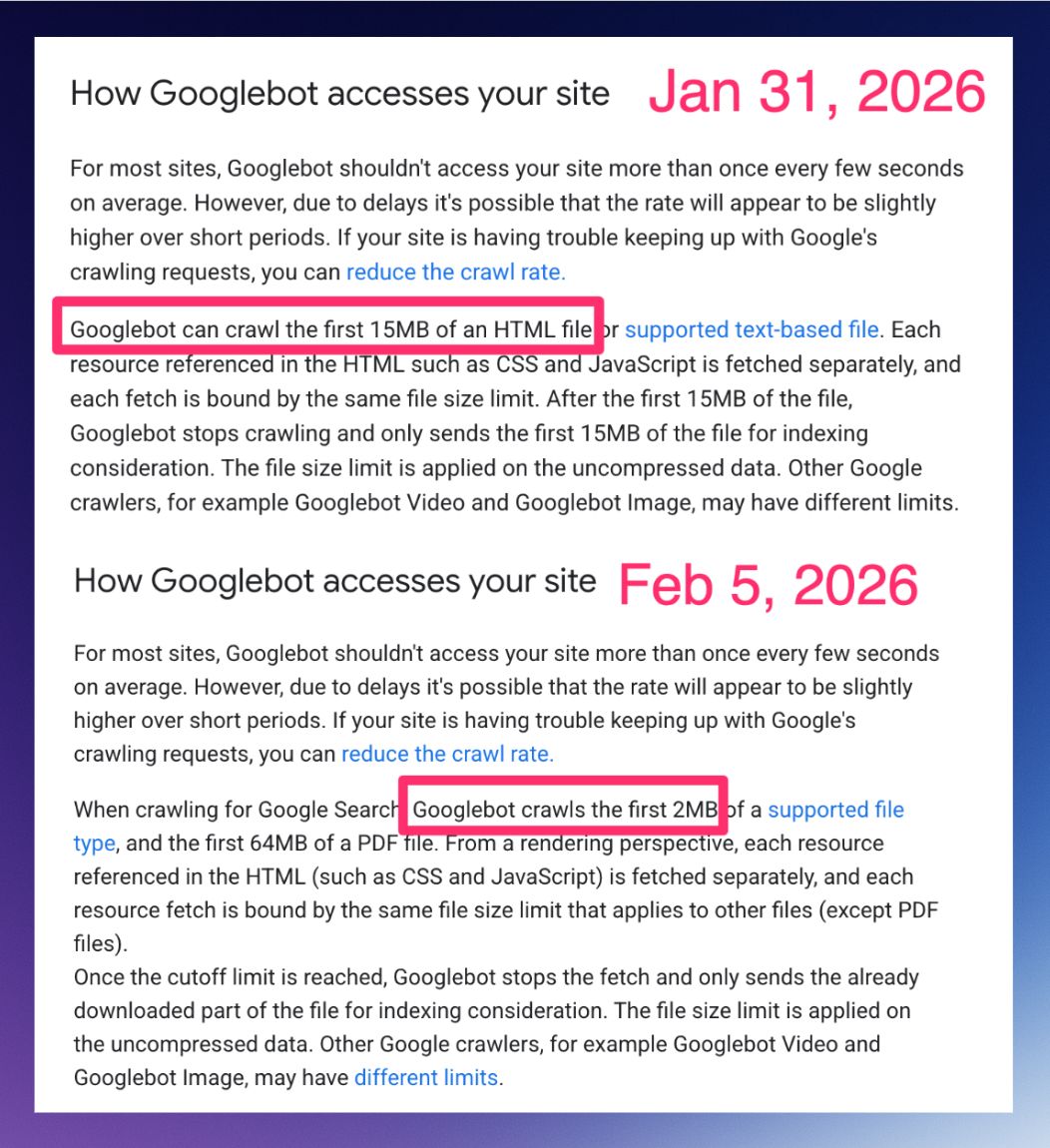
Google’s official text is clear:
“When crawling for Google Search, Googlebot crawls the first 2MB of a supported file type… Once the cutoff limit is reached, Googlebot stops the fetch.”
In plain English: Google’s bot downloads the first 2MB of the file. If the file is larger than that, it cuts off the rest. What was downloaded gets indexed; what was left out effectively doesn’t exist for the search engine.
Check out the screenshot shared by SEO Steve Toth highlighting the update:
The Important Detail: Uncompressed Data
Here is the technical “gotcha” that many overlook. The 2MB limit applies to uncompressed data.
Even if your server sends the file compressed (using Gzip or Brotli) and the network transfer is only 500KB, Googlebot will “unzip” that file to read it. If, upon opening the package, the original file is 3MB, Google will read the first 2MB and ignore the final 1MB.
Myths and Truths: Answering the Market’s Questions
We’ve seen many comments on LinkedIn and forums about the real impact of this change. Let’s simplify SEO and answer the main questions straight to the point:
1. Does the 2MB limit apply to the entire page (HTML + Images + CSS)?
No. The limit is applied per resource. Your HTML file has a 2MB limit. Your featured image has its own limit. Your CSS file has another limit.
Googlebot doesn’t add everything up to see if it hit the limit. It evaluates each HTTP request individually.
This is good news for those with modular sites, but a nightmare for those who centralize everything in giant files.
Unlike other formats, PDFs have a much higher limit of 64MB.
2. Do external files (JS and CSS) count toward the HTML limit?
No. Since Google fetches each resource separately, an external style.css file does not consume your HTML document’s 2MB quota. This means that modularizing your code (using external files instead of putting everything inline in the HTML) is an excellent safety strategy.
3. Are JavaScript sites (Client-Side Rendering) more at risk?
Yes, the risk is higher. Sites built as SPAs (Single Page Applications) that rely on a giant JavaScript file (often called bundle.js) to render content are in the danger zone.
If your main file exceeds 2MB (uncompressed), Google will download a truncated (cut off) version of the script and won’t be able to render anything on the page.
The cycle of disaster: The script doesn’t execute > the page doesn’t render > Google sees a blank screen > goodbye, indexing.
Who is really at risk?
Most well-built sites don’t need to worry. A 2MB HTML file is a lot of text (think of an entire book). However, some technical scenarios require immediate attention:
- Sites with “Code Bloat”: Pages that insert immense CSS and JS directly into the source code (inline) instead of calling external files. For example, heavy WordPress themes or page builders (like Elementor or Divi) that, if poorly configured, inject thousands of lines of inline CSS/JS or create massive single files.
- Base64 Images: Developers who convert images into text code and paste them directly into the HTML. This drastically inflates file size. I’ve seen news portals with huge, heavy code just from converting images to text strings.
- Infinite Lists: E-commerce sites that load hundreds of products in the initial code without pagination or proper lazy loading.
- Excessive Mega Menus: Menu codes that load thousands of links and hidden structures within the HTML.
2 Blind Spots That Can Kill Your SEO
Beyond the obvious risk of the page not loading, there are two silent problems that occur when Google cuts off the end of your HTML:
1. The End of Link Juice (Footer Links)
If Googlebot cuts the last bytes of your HTML, it won’t read your footer. That’s usually where important links to institutional pages, privacy policies, and cross-links reside.
Without reading these links, Google doesn’t pass authority (Link Equity) to these pages, potentially turning them into orphans.
2. Goodbye, Rich Snippets (Structured Data)
Many plugins and developers insert the Structured Data block (JSON-LD) at the end of the <body> code so as not to delay visual loading. If the HTML is cut before this script, Google won’t see your structured data.
Result: You lose the stars, FAQs, and product snippets in search results.
Tip: Use Niara’s Structured Data Generator to create scripts in seconds!
How to Protect and Optimize
To ensure Googlebot consumes all your content, follow these best practices:
- Audit in DevTools: Check your page size directly via Chrome.
- Open the page > Press F12 > Go to the Network tab.
- Reload the page (F5).
- Filter by Doc.
- Look at the Size column (the bottom/gray value is the uncompressed size). If it exceeds 2MB, optimize.
- Sanity Check in Google Search Console: Use the “URL Inspection” tool in GSC. Click “View Tested Page” > “HTML Code”. Scroll to the end. If the
</html>tag isn’t there, Google cut your page. - Important Content at the Top: Ensure titles, metadata, and the main text are at the beginning of the HTML code (
<head>and start of<body>). If there is a cut, let it be the footer, not critical content. - Avoid Excessive Inline Code: Keep your HTML clean. Move styles and scripts to external files.
- Code Splitting for JS: If you use React, Vue, or Angular, break your code into smaller chunks that are loaded only when needed, avoiding a single giant monolithic file.
- JSON-LD at the Top: Move your Structured Data scripts to the
<head>.
The 2MB limit isn’t the end of the world
Google continues to evolve to process the web quickly and sustainably. The 2MB limit is just an important technical reminder: code efficiency is also SEO.
At Niara, we simplify SEO so you don’t have to get lost in technical complexity. And we have some incredible news: starting in March 2026, you will have the Technical SEO Agent in Niara to help you audit these requirements automatically.
In the meantime, use our tool now to boost your strategy, content, and data analysis, and scale your organic results.