
Have you noticed that some Google results appear with star ratings, product prices, frequently asked questions (FAQ), or recipes? This happens thanks to Structured Data (Schema Markup).
Niara’s Structured Data Generator eliminates the technical complexity of writing code manually. Our tool analyzes your page, captures essential information, and delivers the JSON-LD code ready to be implemented.
What is Structured Data and why use it?
Structured data are pieces of code that help search engines understand exactly what your content is about.
The main benefits for your SEO are:
- Rich snippets: Your site gains visual prominence with extra information (ratings, events, prices).
- CTR Increase: Visually rich results attract more clicks than standard text links.
- Greater visibility: It helps Google display your content in special features, such as the news carousel or recipes.
Step by step: how to generate your Schema Markup
Follow these simple steps to create your code in seconds:
1. Access the Tool
In Niara’s tools menu, select Structured Data Generator or access it directly through the free tools link.
2. Insert URL and Language
Paste the URL of the page you want to optimize. Then, select the content language (e.g., English).
3. Choose the Schema type
Niara offers a vast diversity of types to cover all your needs. Select the one that best fits your page:
- Content: Article, Blog Post, Web Page.
- E-commerce: Product, Review.
- Services and Business: Local Business, Organization, Contact.
- Specific: FAQ, How-to, Course, Event, Recipe, Person.
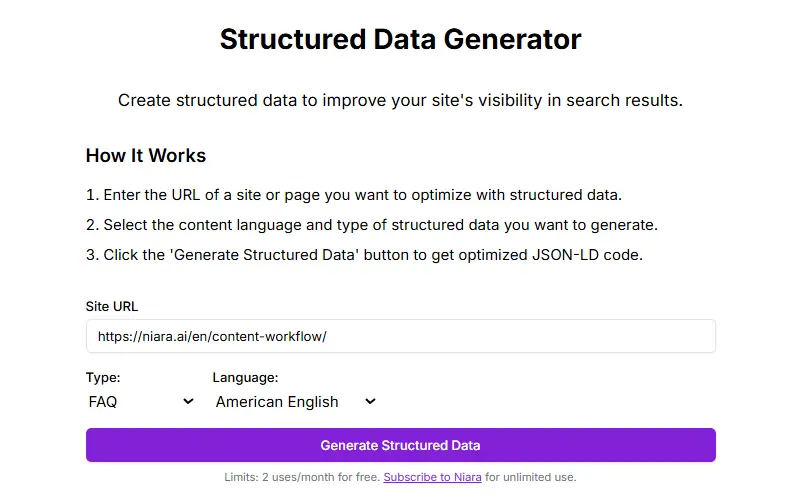
4. Generate and copy the code
Click the “Generate Structured Data” button. Niara will process the page and generate the code in JSON-LD format (the format recommended by Google). Simply copy the generated code.
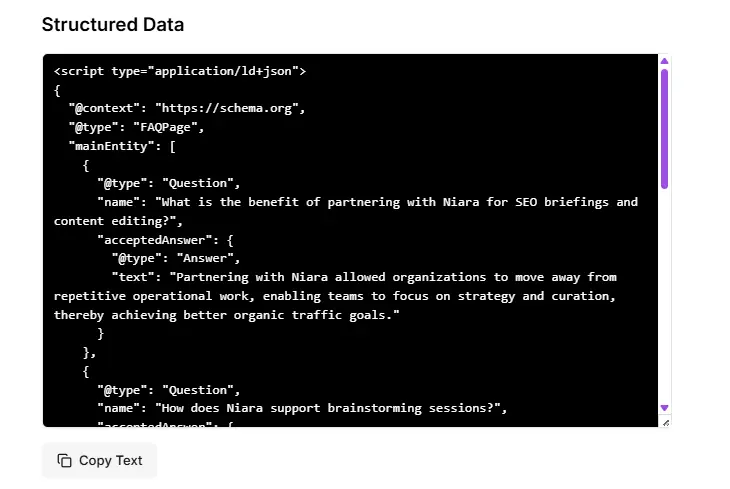
How to implement the code on your site
After copying the code from Niara, you have three main ways to install it:
-
Via CMS (WordPress): Use plugins like "Header and Footer Scripts" to paste the code into the <head> section of the specific page.
- Via Google Tag Manager (GTM): Create a new “Custom HTML” tag and paste the code, setting the trigger for the specific page.
-
Directly in the Code: Paste the script inside the <head> tag of your page's HTML.
Golden Tip: After implementing, use Google’s Rich Results Test tool to validate if the code is working correctly.
Plans and Limits
- Free Users: You can use the tool up to 2 times per month for free.
- Niara Subscribers: Unlimited use for you to optimize all your site’s pages or your clients’ pages without restrictions.
Niara’s Tip:
“Many SEO professionals ignore structured data because they find it ‘too technical.’ With Niara, that barrier is gone. Schema Markup is the most direct way to ‘talk’ to the Google algorithm and LLMs and tell them exactly what your page offers. If you want to increase your click-through rate without needing to move up in position, this is the right tool.”
Want your site to stand out from the crowd? Generate your Structured Data now!