
You know that manufacturer’s description you have on your e-commerce site that would take weeks to change? That’s a thing of the past!
With Bulk Content, Niara’s new exclusive feature, you can now create titles, meta descriptions, or product descriptions in bulk (and quickly!).
And, like all of Niara’s features, Bulk Content has also been configured to generate the best SEO content, optimized for Google.
After all, we know it’s not enough to just generate content; it needs to help your site gain more visibility, traffic, and visits from Google!
Come check out the new feature with us. 🤖
What is Bulk Content?
We know that companies and agencies have to manage hundreds (even thousands) of product, article, or institutional pages that need to be created and/or optimized.
With Bulk Content, you provide Niara with some specifications on how you’d like the content (keywords, tone of voice, etc.), and the tool will generate content that matches your brand in minutes. And the best part, it’s optimized for Google!
After the content is generated, you review it, make any necessary changes, and publish. It’s that simple!
Why you need to invest in bulk creation
Niara‘s main goal is to simplify your SEO routine with features designed to increase your productivity—so you don’t have to spend your day on manual and repetitive tasks—and our new launch is no exception.
With Bulk Content, you simplify content creation that would take weeks or months. You can launch/optimize your site in less time without sacrificing quality and good SEO practices.
The best part is that you don’t need to be an SEO professional or understand optimization to use our tool. Everyone can enjoy the benefits of Bulk Content (and Niara’s other features).
Save time and resources
With Niara’s new feature, you can generate bulk content whenever you need it, saving hours of daily work dedicated to production.
In our user tests, one user told us that her company used to take 3 months to optimize 300 blog article titles. Now, with Bulk Content, “3 months of work was done in just 2 minutes!”. See below.
This way, you and your team can invest your time focusing on other relevant aspects of growing your business and your clients’ businesses.
Ver essa foto no Instagram
3 months of work in just 2 minutes: that’s how much time I’ve optimized in my daily routine as an SEO Analyst using Niara’s new Bulk Content feature.
Budget savings
Reduce costs in just a few clicks! Now, you don’t need to allocate or hire new professionals to handle certain demands for your agency or company. Let Niara do the operational and repetitive work for you.
On the contrary, your agency can now serve more clients, increasing your revenue.
Greater visibility and results
Like all other Niara features, Bulk Content was configured to generate the best SEO content, optimized for Google.
And Google is the most accessed search engine in the world. Appearing on its search results page in a good position can mean more traffic and conversions for your business. These are people looking for what you offer!
Therefore, producing in large volumes can help your domain increase brand reach, gain more visibility, and drive conversions!
How to create Bulk Content with Niara
It’s very simple. We’ve created a step-by-step guide to help you use our tool:
1. Select the spreadsheet template
Give your spreadsheet a name, specify the type of content you want to generate (title, meta description, or product description), and click Download.
But, if this isn’t your first time and you already have our template to fill out, you can skip to step 3 😉
2. Edit the spreadsheet
Add the information as requested. For example, to create a product description, we ask for:
- Product features (just copy and paste the manufacturer’s description);
- Product name;
- Audience;
- Keyword (how users would search for you on Google, in this case, the product name);
- Tone of voice (formal, informal, persuasive…)
3. Upload the file
You have two options to send the specifications to Niara:
- Upload your CSV or Spreadsheet file.
- Or, if you prefer, you can also copy and paste the content from the CSV or spreadsheet.
4. Map the spreadsheet items
Simply match the items you entered in the spreadsheet so Niara can identify each field and know how to generate the content.
5. Verify data
In this step, you should review and validate each item. If there is an error, Niara will indicate it in red. You can either click the X to remove that row or click on the red item to correct it.
You can also click the Add button at the bottom of the table to insert more information (new items that weren’t in the spreadsheet). Niara will add these new items and create them all for you.
6. Now it’s time to generate the content!
Is everything correct? On the next screen, select the items you want to generate and click generate content.
This final step is ideal because you can upload a spreadsheet with 200 products and decide to initially generate content for only 100. With Niara, you can! Select those 100, generate the content, and when you want to generate the other 100, come back to this step, select them, and generate. It’s that simple =)
Niara quickly returns the complete result. Just click the “Download” button to download the spreadsheet with all the generated content.
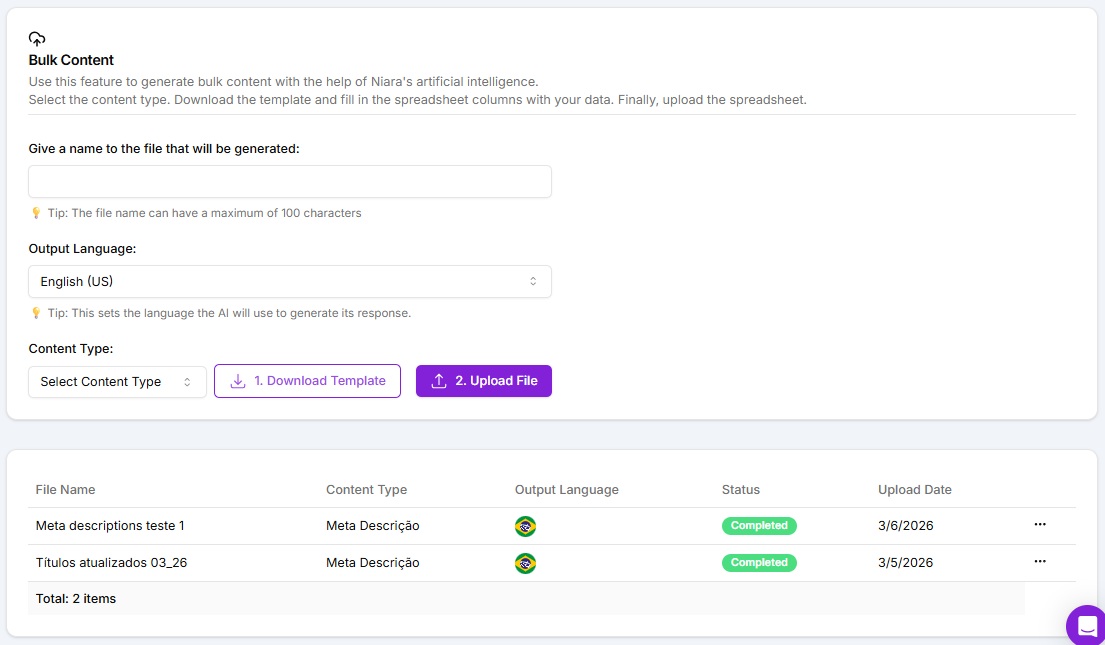
History of generated content
On the dashboard, you will have access to your entire bulk content creation history:
- Uploaded: You uploaded a spreadsheet to Niara but did not generate the content.
- In progress: You uploaded a spreadsheet but did not generate content for all the information in it. For example, you uploaded a sheet with 100 items and only generated 50. Just click on the name and return to where you left off to generate the remaining 50 (or even all 100 at once if you want new content suggestions for all products).
- Completed: You uploaded the spreadsheet and generated the content.
Check below:
Best practices to prevent bulk content from becoming duplicate content (without losing quality)
When you generate hundreds of titles, metas, and descriptions, the time savings are enormous—but the risk is publishing “generic” pages with the same arguments and little differentiation between SKUs. To avoid this, it’s ideal to use fields that force real variation (main benefit, use, audience, differentiators, objections) and define clear standards for size, tone, and structure before generating. This way, each page becomes unique on its own merit (not just through “fluff”) and remains aligned with search intent.
Quick checklist to maintain quality and relevance at scale
- Standardize the format by page type:Product, category, and institutional pages cannot follow the same text model.
- Define 1 objective per content piece:Ranking (informational) or converting (transactional) changes the text’s priority.
- Ensure variation in “reason to buy”:Different benefits per SKU/category (durability, comfort, warranty, material, occasion of use).
- Include fields that make the text specific: Material, measurements, compatibility, certifications, package contents, care, and use.
- Avoid unprovable claims:“The best,” “the most sold,” “100% guaranteed” only if you have a source/proof.
- Anti-duplication rule:If two SKUs only differ by color/size, the text needs to change the context of use and the real highlight (not just an adjective).
- Include real semantics: Natural variations (model, line, type, occasion, problem it solves), not “keyword stuffing.”
- Create a fixed block + variable block:Fixed (tone/brand) and variable (benefits/use/differentiators) to maintain consistency without being repetitive.
- Size control: Title (up to ~55–60 characters), meta (up to ~150–160), description with ranges (short/medium/long) by category.
- Technical checklist:No broken characters, no duplicate titles/metas, no placeholders, no forbidden terms, no medical/legal promises.
How to review and bulk publish safely (SEO + conversion)
The review stage is where you protect the site from errors at scale: a small flaw multiplied by 300 URLs becomes a major problem. Instead of reviewing everything by eye, set up a quick workflow: first, validate by sampling, correct patterns (what is repeatedly wrong), and only then do the bulk publication. This maintains speed without losing quality and reduces rework later.
Practical review workflow (quick and realistic):
- Validation by sample (5–10%):Take a sample from each product category/line and review it thoroughly.
- Find error patterns:Inconsistent tone, excessive adjectives, wrong measurements, repeated terms, weak CTA, exaggerated promise.
- Adjust the “template”/fields:If the error is standard, correct it at the source (spreadsheet/fields) and regenerate.
- Accuracy review (hard check):Price does not go in the description if it varies, specifications match the technical sheet, compatibilities are correct.
- SEO review (soft check):Title with keyword + differentiator, meta with benefit + CTA, consistent H1, no internal duplication.
- Publish in waves: Publish 50–100 URLs, monitor performance and errors, then publish the next batch.
- Post-publish monitoring (7–14 days):Search Console (impressions/CTR/coverage), pages with low interaction, cannibalization.
Control table for bulk publishing (simple model)
Before publishing, organize a control sheet to avoid getting lost and to ensure traceability of what was generated and reviewed:
| Batch | Page Type | URL Qty | Review Status | Responsible | Publication Date | Notes |
|---|---|---|---|---|---|---|
| 1 | Product | 100 | Reviewed (sample ok) | ___ | ___ | Adjust tone in “line X” |
| 2 | Product | 100 | Pending | ___ | ___ | Needs measurement validation |
| 3 | Category | 30 | In review | ___ | ___ | Review CTA and intent |
See how easy and fast it is to create bulk content with Niara’s AI?
The new feature is now live and available on all plans. Access niara.ai and try it out!
And if you haven’t created your Niara account yet, sign up and get 7 free days to try all the features! 💜
Transform your SEO and Content Production routine with Niara! 😉
