
Have you seen the news? Google Search Console (GSC) has launched an experimental feature that allows you to use AI to set up reports. Basically, you can type “which pages have a low CTR,” and it will apply the filters to the table for you.
Is it an evolution? Without a doubt.
Does it help those who struggle with regular expressions (Regex) or the complex filter interface? Absolutely.
But, to be direct with you—the person who lives and breathes the daily SEO grind: does this solve your problem of lacking time and needing a real strategy? No.
Google’s new feature is a setup assistant, not a data analyst. It configures the table, but the person who has to look at the rows, cross-reference information, understand the “why,” and decide what to do is still you (and your Excel spreadsheet).
At Niara, we believe AI should go far beyond applying filters. It should deliver the complete answer and the action plan.
Today, I’m going to show you, in practice, the difference between GSC’s new feature and Niara’s Search Analytics, and why our AI is the true partner you need to scale your results.
The Big Difference: Interface Filters vs. Real Intelligence
Google made it clear in its official documentation: “the feature is designed for setup (filters, comparisons, metrics). It cannot perform actions like sorting the table, exporting data, or providing insights.“.
In other words, if you ask GSC, “Why did my traffic drop?” or “How can I improve this page?“, it won’t know how to answer. It will only filter the data if you know the exact technical command to ask for.
The Scenario in GSC (New Feature):
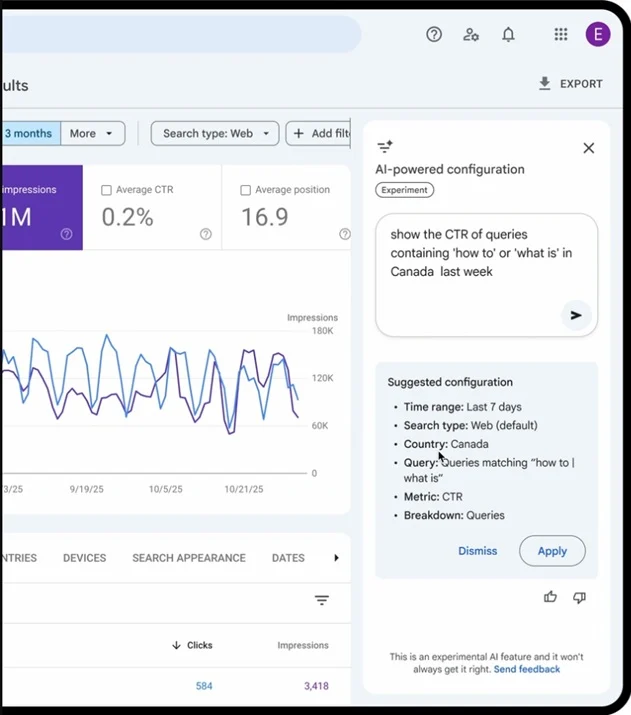
You type: “Show queries containing ‘how to’ or ‘what is’ in Canada from last week.” (see screenshot below) GSC returns a filtered table.
And now what? Now you export the data, open Excel, analyze URL by URL, try to guess the search intent of each term, and manually write down what needs to be optimized.
The Scenario in Niara (Conversational Analytics):
You open ChatSEO, which is integrated with Search Analytics, and type:
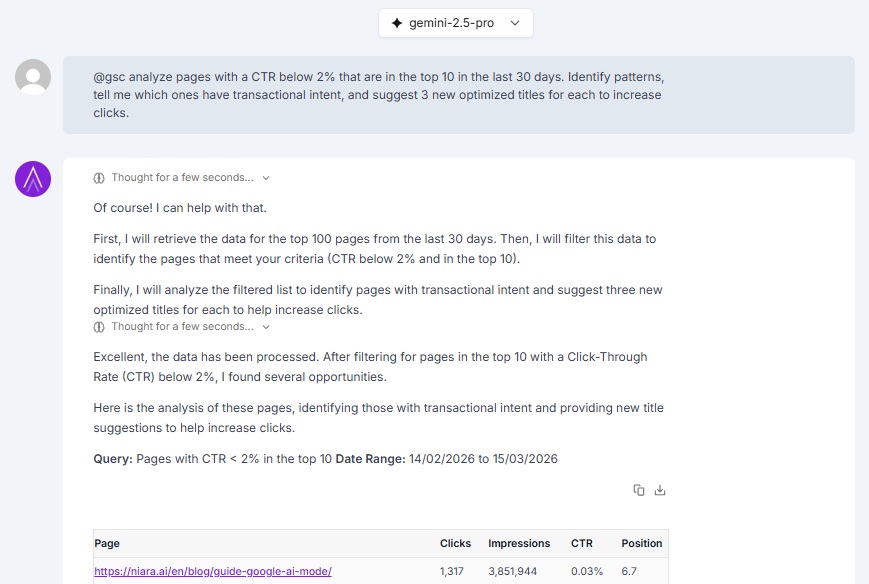
“Analyze pages with a CTR below 2% that are in the top 10. Identify patterns, tell me which ones have transactional intent, and suggest 3 new optimized titles for each to increase clicks.”
Niara doesn’t just filter. It:
- Reads and interprets the data;
- Understands semantic context;
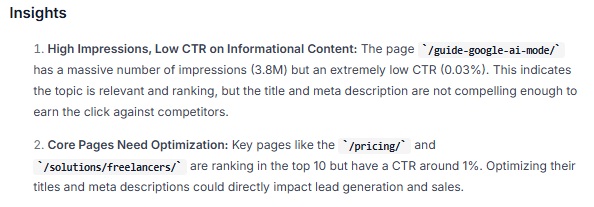
- Generates insights (the “why”);
- Suggests optimizations (the “how-to”).
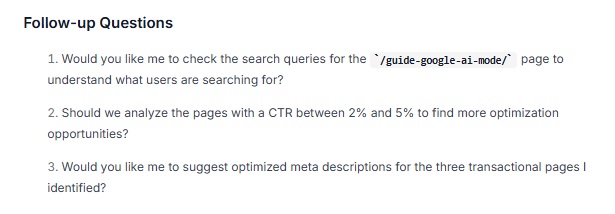
- Suggests the next questions to deepen the analysis (next steps).
See the difference? GSC gives you the raw ingredients. Niara delivers the finished cake.
See a real interaction in ChatSEO below:
Niara understands your request and generates all the requested information, starting with a table showing the performance of each page:
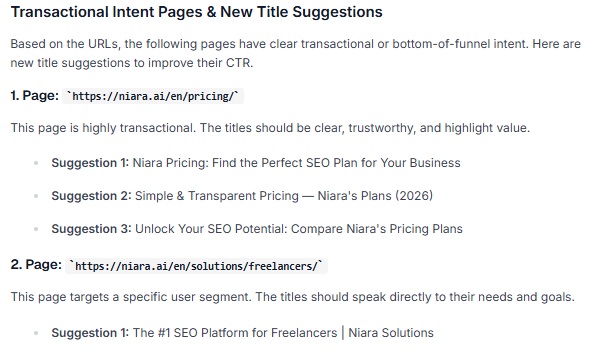
It then suggests optimizations for each page based on its context:
It generates several insights:
And it suggests the next questions to either deepen the analysis or start optimizing the content right away:
4 Reasons Why Niara’s Search Analytics is Superior
If your goal is to save time and scale, here’s where Niara leaves Google’s native feature behind:
1. Ready-Made Diagnostics (Goodbye, Manual Setup)
In GSC, to find serious issues like Keyword Cannibalization, you need to download data, create pivot tables, and hunt for competing URLs. Google’s AI doesn’t do this.
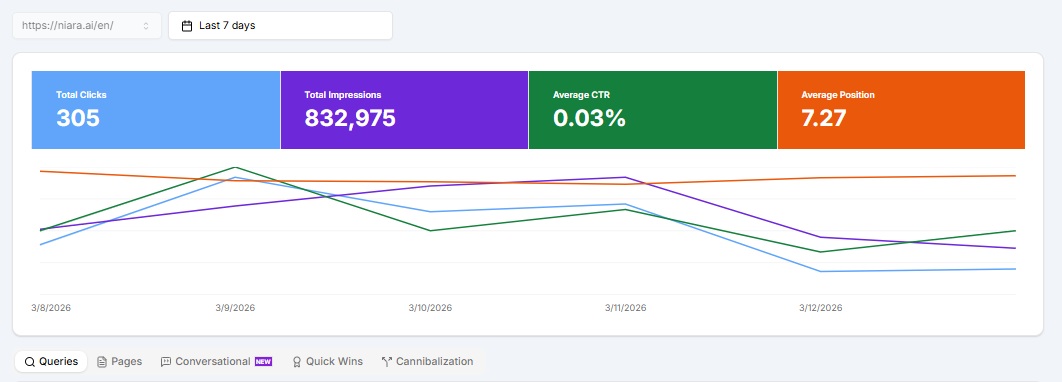
In Niara’s Search Analytics, we have exclusive, native reports. With one click, you can access:
- Cannibalization Report: See which pages are “stealing” traffic from each other and hurting your rankings.
- Quick Wins: Keywords with high impressions and low clicks—terms ready to break into the Top 10 with minimal effort.
- Conversational Queries: See the conversational-style searches users are already making on Google’s channels (Search and AI Mode).
We don’t wait for you to ask. We show you where the money is.
2. Search Intent Understanding
GSC shows you the keyword. That’s it. It doesn’t tell you if the user wants to buy, learn, or just navigate.
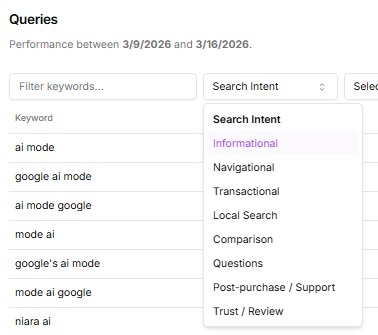
Niara automatically classifies your queries by Search Intent (Informational, Transactional, Commercial, and Navigational).
Why does this matter? There’s no point in filtering for “keywords with high impressions” in GSC if you don’t know whether that term converts. In Niara, you can use our Advanced Filters to focus only on transactional terms and direct your efforts where the ROI is guaranteed.
3. Conversational Analytics: Truly Talk to Your Data
Google’s feature accepts commands to configure a view. Niara’s Conversational Analytics accepts strategic dialogues.
You can use our prompt library or create your own to ask things like:
- @gsc niara, we published the article at https://niara.ai/blog/ucp-seo-ecommerce/ on January 19th. Did it get any impressions or clicks on the same day or the next day? Provide data for this URL only.
- @gsc compare the data above with the previous period, ending on XXXX. Analyze points of improvement or decline and suggest optimizations.
We integrate the data (Search Analytics) with the execution (ChatSEO and Gemini/GPT). Google keeps the data isolated from the action.
4. Data Volume (5x More)
GSC has sampling limitations in its standard interface (usually capping the view at 1,000 rows). Search Analytics stores and processes up to 5x more data, allowing you to analyze up to 5,000 terms and pages at once.
For large sites (Enterprise) or e-commerce stores, this depth is the difference between finding a golden opportunity and losing it due to a lack of data.
Comparison: The SEO Professional’s Routine
Let’s get hands-on. Imagine you need to optimize an old blog post that has lost traffic. Here’s what the routine looks like in both tools:
| Required Action | New GSC with AI | Niara’s Search Analytics |
|---|---|---|
| Filter the URL | “Show data for url /blog/example” (Works) | Simple filter or via Chat (Works) |
| Identify a Drop | “Compare with previous period” (Shows a graph) | Shows a graph, detailed comparison table, and insights. |
| Analyze Intent | Doesn’t do it. You have to guess by reading the list. | Automatic. Shows if it’s Info/Commercial/Transactional… |
| Find Cannibalization | Doesn’t do it. Requires manual export. | 1 Click. Automatic cannibalization report. |
| Create an Action Plan | Zero. You have to figure out what to do. | Immediate. Niara suggests new titles, H2s, and meta descriptions based on the data. |
Simplify, Don’t Just Filter
Google Search Console is the source of truth, and its new AI feature is a welcome addition for quick setups and for those who haven’t mastered complex filters. But configuring a report isn’t doing SEO.
Doing SEO is about finding the insight, fixing the error, and publishing the improvement before your competitor does.
Niara was built by people who have been doing SEO for 16 years. We know you don’t want to spend 2 hours setting up filters to see a table; you want to spend 10 minutes solving the problem and watching your traffic grow.
If you want to start acting like a data strategist, this is the place to be.
Try Niara’s Search Analytics for free and see your data talk (and work) with you.
