
New here? Learn the platform’s basics and start scaling your SEO strategy in minutes, not hours.
We know the SEO grind: dozens of open tabs, endless spreadsheets, and disconnected tools. Niara was built to solve exactly that. We are an all-in-one platform that combines data intelligence with the power of cutting-edge AI (OpenAI and Gemini).
Here’s what you achieve with Niara:
Your goal is traffic and conversions; ours is to give you the tools to get there faster.
We believe the best way to understand Niara’s value is by seeing it in action on your own projects. That’s why we offer a 7-day free trial for you to explore our features.
Here’s how your trial works:
Pro Tip: Don’t just “look around” during these 7 days. Create an article, run a keyword analysis, or optimize an existing page. Niara is an action-driven tool.
Note: Our free trial requires no credit card and has no auto-renewal. At the end of the trial, you don’t need to cancel anything; your access simply pauses. You only subscribe to a plan (Solo, Team, or Enterprise) if you want to keep growing with us.
Welcome to Niara! If you’ve just arrived, enjoy the features—our workflow is designed to be intuitive.
When accessing the tool for the first time, you’ll go through a quick onboarding. These steps are essential for us to calibrate Niara AI according to your needs. Here is how it works:
1. Define the Scope:
2. Understand your Initial Credits: Upon reaching the Dashboard (main screen), you’ll have immediate access to the free plan, which includes:
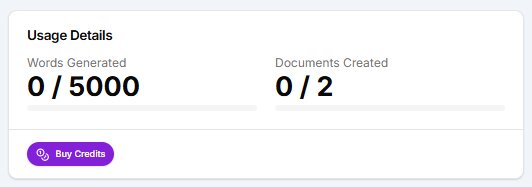
Pro Tip: Keep an eye on the onboarding missions at the top of the screen to earn extra credits!
3. Strategic Setup (Crucial Step): Before you start generating content, we highly recommend going to “Project Settings” (click the gear icon in the sidebar). There you should:
Your “Day 1” Roadmap. To make the most of your first day, follow this script:
Ready to simplify your SEO? The dashboard is all yours.
Keeping your account properly configured ensures you receive the right notifications and that your team (if applicable) has the proper access.
Step-by-step setup:
If you are on a Team or Enterprise plan, this is the section where you can invite new members to collaborate on your projects.
Note: To guarantee total security for your company’s data, Niara requires each invited user to connect their own Google Search Console (GSC) account. This ensures that only people with active access in Google can view the project’s metrics.
The real magic of Niara happens when we combine AI creativity with your website’s actual data. When you connect Google Search Console, you stop guessing and start making strategic decisions based on exactly how Google sees your pages.
Why should you connect? Without GSC, Niara can still assist you with general data, but you miss out on real numbers, deep personalization, and analytical speed. Once Search Console is connected, Niara transforms into your Senior Data Analyst—capable of instantly identifying traffic drops, hidden keyword opportunities, and content cannibalization.
Quick step-by-step guide:
Security First: We use the official Google API. Following our strict Zero Data Retention (ZDR) policy, your data is used exclusively for your own analyses. It is never shared, nor is it ever used to train third-party AI models. Your data is yours.
We know SEO doesn’t end with text creation; it needs to go live. To accelerate your routine and reduce operational friction, Niara makes it easy to send everything you produce directly to your Content Management System (CMS) or sales platform. The tool does the heavy lifting, you apply your strategic curation, and publishing happens much faster.
Main integration and export features:
Our goal is to eliminate unnecessary “Ctrl+C / Ctrl+V” and make your content flow from ideation to publication in record time. We simplify SEO so you can focus on what really matters: scaling your results.
One of the biggest pain points when using AI is generic content. At Niara, we solve this by letting you set the “rules of the game” before you even start writing.
What you can customize:
Furthermore, we know every business has a unique workflow. That’s why Niara was designed not just as an “out-of-the-box” tool, but as a platform that adapts to your company’s rules and needs.
For large operations, we go further with the Enterprise plan. We tailor the tool to your specific needs, which includes:
Whether you are a solo consultant or a large corporation, the tool molds to your challenge.
SEO has no borders, and neither does Niara. If you manage international websites or plan to expand your operation to other markets, our platform is ready to accompany you.
Currently, Niara can analyze data, generate briefings, and write complete articles in:
How it works: When starting a new Content Workflow or chatting with ChatSEO, you can instruct the AI to generate the response in the desired language. Additionally, within the SEO & Marketing Tasks tools, you can define which language you want to see the result in.
If you prefer to change the interface language entirely, access My Account > Preferred Language.
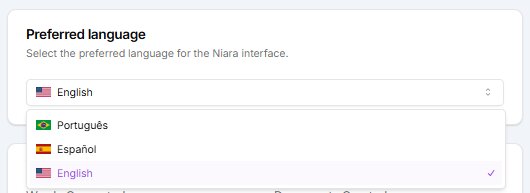
This is ideal for creating local versions of your website or targeting international SERPs with the same technical quality you use in your home market.
Converse com a nossa equipe e conheça a fundo como a Niara poderá contribuir para aumentar a produtividade e eficiência de seu time de SEO e Marketing.