
Tired of having to explain who your company is in every new prompt? Niara’s Brand Voice Guide allows you to configure your brand’s persona, tone of voice, and grammatical rules just once.
Once configured, Niara automatically applies this context across all tools (ChatSEO, Content Workflow, AI Agents, and Bulk Content…), ensuring absolute consistency in every generated text.
Why configure the Brand Voice Guide?
- Consistency: Ensures all articles and copies maintain the same verbal identity.
- Agility: Eliminates the need for repetitive, massive commands (prompts).
- Scale: Allows different team members to generate content that sounds like it was written by the same person.
Note: The Brand Guide is available for both free trial users and subscribers of all our plans, from Solo to Enterprise. Regardless of your operation’s size, we ensure your brand identity is preserved in every output.
Step by Step: How to configure your Brand Voice Guide
The Brand Voice Guide is configured within the Project Settings. Follow the steps below:
1. Access Project Settings
- In Niara’s sidebar, access the edit tab of an existing Project by clicking the gear icon.
- To create a new Project and edit it, click the sidebar menu “Back to projects > New Project” or click the dropdown menu at the top of the screen and then “+New Project”.
2. Define Persona and Target Audience
In the “Brand Voice Guide” tab, describe who the brand is or, if you prefer, click the “Generate Guidelines” link, and Niara will analyze all information about your brand on the internet and create your Brand Voice Guide instantly.
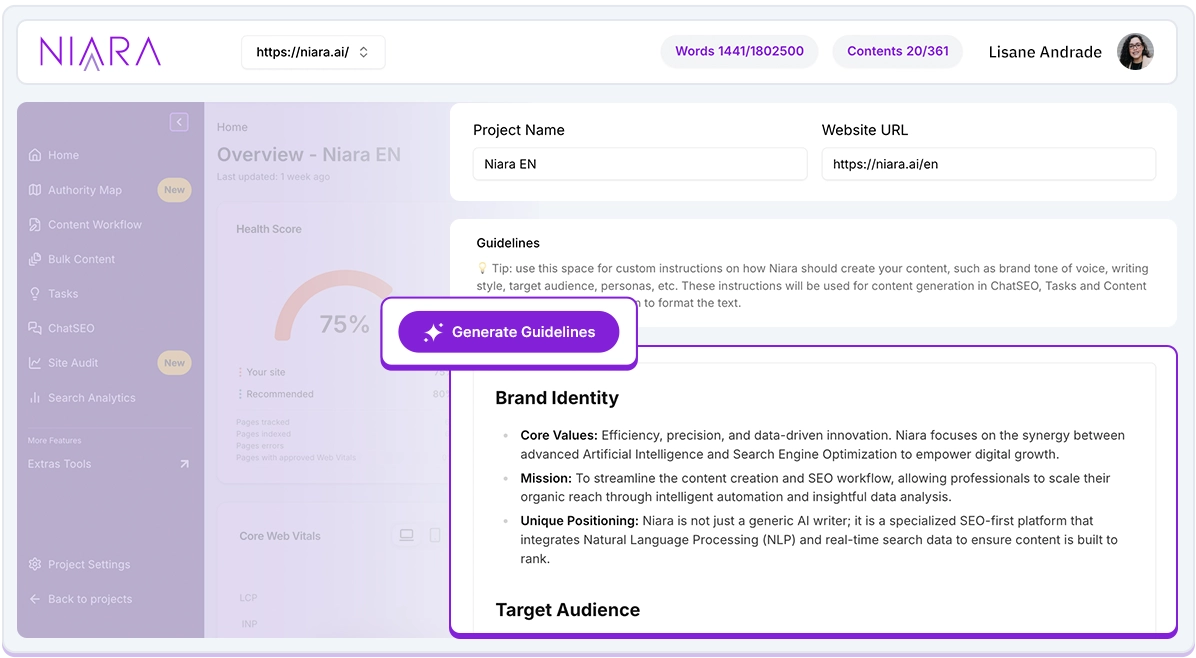
- Niara’s Tip: Don’t just say “We are a tech company.” Instead, try: “We are an innovative fintech that talks about finance in a simple way for young people aged 18 to 25.”
3. Choose the Tone of Voice
How should your brand sound? Select the characteristics that best define your communication:
- Examples: Educational, inspiring, direct, formal, or playful.
- You can define if the brand uses “you” or “thou” (where applicable), if it’s more serious, or if it uses emojis and slang.
4. Writing Rules and Guidelines
This is the most strategic part. Here you define what Niara should and should not do:
- Forbidden words: List terms your brand never uses.
- Formatting: Do you prefer short paragraphs? Bullet point lists? Catchy headlines?
- CTA (Call to Action): Define how you like texts to end (e.g., always inviting for a free trial).
5. Save and apply
After filling it out, click Save. From now on, whenever you are within this project, Niara will consult these guidelines before generating any response.
Where is the Brand Voice Guide applied?
Niara’s differentiator is that this intelligence is transversal:
- ChatSEO and AI Agents: When asking for a social media post, Niara will already know your tone of voice.
- Content Workflow: Generated articles will already come with the structure and vocabulary you defined.
- Bulk Content: Perfect for e-commerces that need thousands of product descriptions following the same brand standard.
- Authority Map: receive a unique authority diagnosis for your brand and dominate your niche.
Pro Tips for an Unbeatable Guide
- Be specific: The more details you provide about the brand’s “personality,” the better the result will be.
- Provide examples: If possible, paste a small snippet of a text you consider the “gold standard” for your brand in the descriptions.
- Use different Projects: If you are an agency, create a project for each client. This way, Brand A’s guidelines will never mix with Brand B’s.
Niara’s Tip:
“The Brand Voice Guide is what separates generic content from strategic content. With it, Niara becomes a member of your team who knows the company culture. Invest 15 minutes configuring this well and save hours of editing later. It’s the secret to scaling without losing your brand’s soul.”
Ready to give your brand a voice? Configure your Brand Voice Guide now in the Project Settings.